Tri-Lighting
This add-on creates a simple three point studio style lighting set up.
Activation
Open Blender and go to Preferences then the Add-ons tab.
Click Lighting then Tri-Lighting to enable the script.
Interfaccia
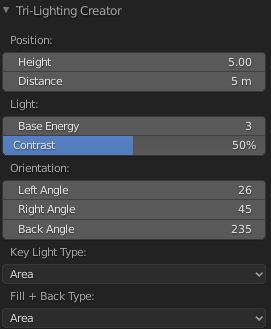
Located in the .
Uso
Select the object to point the lights at.
Add the lights with .
Adjust settings in the Tri-Lighting Creator Regola Ultima Operazione panel.
The created lights are pointed at and locked to the active object using a Track To constraint.
In the you can further edit the properties of your lights.
Riferimento
- Categoria
Illuminazione
- Descrizione
Add three point lighting to the selected or active object.
- Posizione
- File
lighting_tri_lights.py
- Autore
Daniel Schalla
- Manutentore
meta-androcto
- Licenza
GPL
- Livello di Supporto
Community
- Nota
Questo add-on è fornito con Blender.