Blender 3.3 Manual Logo

Getting Started

  • A proposito di Blender
  • Installare Blender
  • Configurare Blender
  • Sistema di Aiuto

Sezioni

  • Interfaccia Utente
    • Sistema di Finestre
    • Mappa dei tasti
    • Interface Controls
      • Buttons and Controls
      • Extended Controls
        • Menu Blocco dati
        • List View
        • Selettore Colore
        • Widget Rampa Colore
        • Tavolozza dei Colori
        • Widget Curva
        • Cerca
          • Menu Search
          • Ricerca operatore
        • Nodi
    • Tools & Operators
  • Editor
  • Scenes & Objects
  • Modellazione
  • Sculpting & Painting
  • Grease Pencil
  • Animation & Rigging
  • Fisica
  • Rendering
  • Composizione
  • Motion Tracking & Masking
  • Video Editing
  • Assets, Files, & Data System
  • Add-ons
  • Avanzate
  • Risoluzione problemi
  • Glossary

Partecipa

  • Contribute Documentation
Blender 3.3 Manual
  • »
  • Interfaccia Utente »
  • Cerca

Cerca

Menu Search

Riferimento

Modalità

Tutte le Modalità

Menù

Edit ‣ Menu Search

Scorciatoia

F3

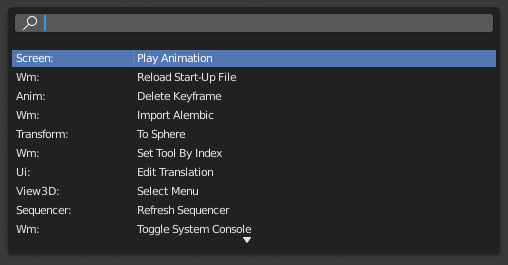
The Menu Search pop-up lets you search Blender’s interface for a certain operator and execute it. First narrow down the list by typing (part of) the operator’s name, then either click the operator with LMB, or navigate to it with Down and Up and activate it with Return.

Apart from the operator names, the pop-up also shows the menus where they’re located.
../../../_images/interface_controls_templates_operator-search_pop-up.png

The Menu Search pop-up.

Vedi anche

The Spacebar Action option in the Preferences.

Ricerca operatore

Riferimento

Modalità

Tutte le Modalità

Menù

Edit ‣ Operator Search

When Developer Extras are activated, the Operator Search can be accessed from the Edit menu in the Topbar. This menu searches all Operators within Blender, even if they are not exposed in a menu. This is useful for Python developers for testing purposes. Blender might also include a few advanced operators that are not exposed in a menu and can only be accessed via this search menu.

Precedente Prossimo

© Copyright : This page is licensed under a CC-BY-SA 4.0 Int. License. Ultimo aggiornamento 10/02/2024.

  • Edit Page
  • Segnala il problema in questa pagina
  • 3.3
    Versions
    • Loading...
  • it
    Languages
    • Loading...