시작화면
When starting Blender, the splash screen appears in the center of the window. It contains options to create new projects or open recently opened blend-files. A more detailed description can be found below.
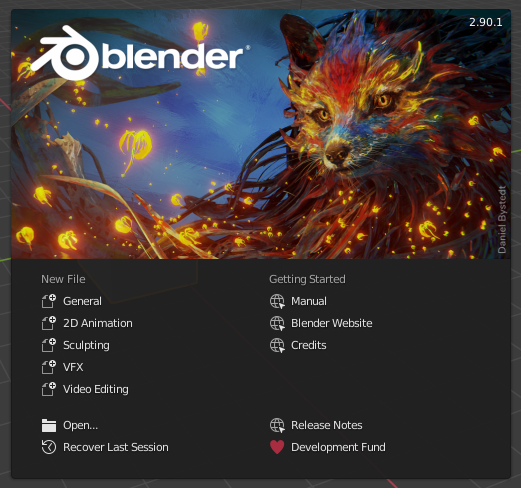
블렌더의 시작화면
시작화면을 닫으려면 시작화면 바깥 아무데나 클릭하거나 Esc 를 누르세요. 시작화면이 닫히고 블렌더 창이 보일 거예요.
To reopen the splash screen click on the Blender icon in the Topbar and select Splash Screen.
- Information Region
The upper part of the splash screen contains the splash image with the Blender version in the top right.
- Interactive Region
The interactive region is the bottom half of the splash screen.
- New File
Start a new project based on a template.
- Recent Files
가장 최근에 열었던 블렌더 파일들이에요. 빠르게 열어보기 편하죠.
- Open
어딘가에 저장된 블렌더 파일을 열 수 있어요.
- Recover Last Session
블렌더가 임시 파일을 뒤져서 마지막으로 작업하던 상태를 복구해 줄 거예요. Recovering Data 를 읽어보세요.
- 링크
Links to the official web site. The same links can be found in the 도움말 메뉴 of the Topbar.
참고
When starting Blender for the first time, the Interactive Region contains a Quick Set Up Process.