Quadro
The Frame node is used to organize and group other nodes within the editor. It helps manage complex node trees by visually grouping related nodes together.
Frames are particularly useful when the setup is too large to view easily at once, or when you want to separate logical sections of a node tree without creating a reusable Node Group.
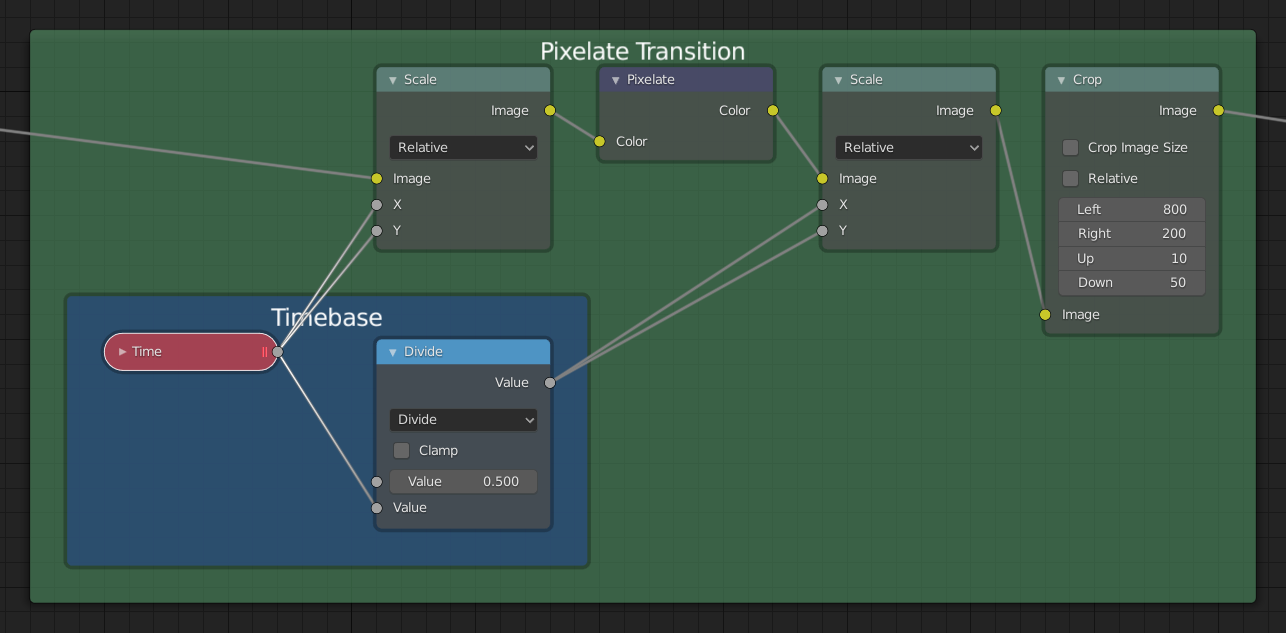
Example of a Frame node used to organize nodes.
Uso
Nodes can be added to a frame by dragging them inside it.
Moving the frame also moves all contained nodes.
Frames can be resized by dragging the corners or edges.
The frame can display a custom label, useful for naming sections of your node setup.
Propriedades

- Label Size
O tamanho da fonte do rótulo. Por exemplo, para a subordinação de quadros que possuem ladrilhos menores.
- Shrink
Once a node is placed in the Frame, the Frame shrinks around it so as to remove wasted space. At this point it is no longer possible to select the edge of the Frame to resize it, instead resizing occurs automatically when nodes within the Frame are rearranged. This behavior can be changed by disabling this option.
- Text
When you need to display more comprehensive text, frame nodes can display the contents of a text data-block. This is read-only, so you will need to use the Text Editor to modify the contents.
Editing
Juntando em um novo quadro
Referência
- Menu:
- Atalho:
F
Creates a new Frame node around the selected nodes.
When called using the shortcut F, a popup appears allowing you to assign a custom Label to the new frame node. This label is shown as the title of the frame and can be used to describe its contents.
Add to Frame
Referência
- Atalho:
Ctrl-P
Once a frame node is placed, nodes can be added by dropping them onto the frame or by selecting the node(s) then the frame and using Ctrl-P. This can be thought of as Parenting the selection to the frame.
Remover do quadro
Referência
- Menu:
- Atalho:
Alt-P
To remove nodes from a frame, select and use Alt-P. This can be thought of as unparenting the selection from the frame.