Annotate Tool
The annotation tool is available in multiple editors. It can be used to add notes to e.g. 3D objects or node setups.
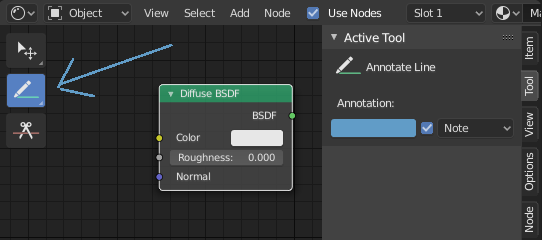
The annotation tool can be activated in the Toolbar on the left side. It has a couple of sub-tools listed below.
- Poznámka
V hlavnej oblasti kreslí ťahy voľnou rukou.
- Čiara poznámky
Kliknutím a ťahaním vytvoríte čiaru. Voliteľne môžete zvoliť štýl šípky pre začiatok a koniec čiary.
- Polygón poznámky
Click multiple times to create multiple connected lines. The current polygon is finished when Esc is pressed.
- Štýl začiatku, konca
Dekorácia, ktorá sa má použiť na začiatku alebo na konci úsečky. To sa dá použiť napríklad na vytvorenie šípok na zvýraznenie konkrétnych detailov v scéne.
- Zmazať poznámku
Click and drag to remove lines. The eraser has a Radius setting found in .
Nastavenia
Všeobecné
There is a panel, , in it multiple annotation layers can be managed.
- Farba
Adjusts the color of existing and new strokes.
- Nepriehľadnosť
Upravuje priehľadnosť existujúcich a nových ťahov.
- Hrúbka
Upravuje hrúbku existujúcich a nových ťahov.
- Cibuľové šupky
Ukazuje obraz duchov ťahov vytvorených v snímkach pred a za aktuálnou snímkou. Cibuľové šupky fungujú iba v 3D zábere a Radiči sekvencie. V dokumentácii Pastelky nájdete vysvetlenie Cibuľové šupky.
- Stabilizácia ťahu
Pomáha znižovať chvenie ťahov pri kreslení oneskorením a opravou polohy bodov.
- Polomer
Minimálna vzdialenosť od posledného bodu pred pokračovaním ťahu.
- Faktor
Faktor vyhladenia, kde vyššie hodnoty vedú k vyhladenejším ťahom, ale pocit kreslenia vytvára dojem, akoby ste naťahovali ťah.
3D Editor
When creating new annotations in the 3D Viewport, there is one tool setting.
- Umiestnenie
The Placement option determines where the line is drawn in 3D space.
- 3D kurzor
Draw on an imaginary plane that goes through the 3D cursor and is aligned to your view.
- Pohľad
Draw in screen space instead of in 3D space. That means, that the line will stay on the same position in the screen, even when the camera moves or rotates.
- Povrch
Project the line on the surface under the mouse.