Blender 3.3 Manual Logo

入门

  • 关于 Blender
  • 安装 Blender
  • 配置 Blender
  • 帮助系统

章节

  • 用户界面
    • 窗口系统
    • 键位映射
    • Interface Controls
      • Buttons and Controls
      • Extended Controls
        • 数据块菜单
        • 列表视图
        • 拾色器
        • 颜色渐变部件
        • 调色板
        • 曲线部件
        • 搜索
          • 菜单搜索
          • 运算符搜索
        • 节点
    • 工具 & 操作
  • 编辑器
  • 场景 & 物体
  • 建模
  • 雕刻 & 绘制
  • 蜡笔
  • 动画 & 绑定
  • 物理
  • 渲染
  • 合成
  • 运动追踪 & 遮罩
  • 视频编辑
  • 资产、文件 & 数据系统
  • 插件
  • 高级
  • 问题排查
  • 词汇表

参与

  • 贡献文档
Blender 3.3 Manual
  • »
  • 用户界面 »
  • 搜索

搜索

菜单搜索

参考

模式

所有模式

菜单

编辑 ‣ 菜单搜索

快捷键

F3

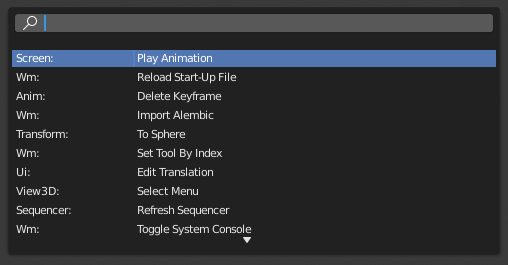
菜单搜索弹出窗口让你在 Blender 的界面上搜索某个操作并执行它。首先通过输入 "操作" 的名字(部分)来缩小列表范围,然后用 LMB 点击 "操作",或者用 Down 和 Up 导航到它,用 Return 激活它。

除了 "操作" 名,弹窗还列出了他们在菜单里的位置。
../../../_images/interface_controls_templates_operator-search_pop-up.png

搜索弹出菜单。

See also

偏好设置中的空格键动作选项。

运算符搜索

参考

模式

所有模式

菜单

编辑 ‣ 运算符搜索

When Developer Extras are activated, the Operator Search can be accessed from the Edit menu in the Topbar. This menu searches all 操作项 within Blender, even if they are not exposed in a menu. This is useful for Python developers for testing purposes. Blender might also include a few advanced operators that are not exposed in a menu and can only be accessed via this search menu.

Previous Next

© Copyright : This page is licensed under a CC-BY-SA 4.0 Int. License. Last updated on 10/02/2024.

  • Edit Page
  • 报告本页面的问题
  • 3.3
    Versions
    • Loading...
  • zh-hans
    Languages
    • Loading...