Blender 3.2 Manual Logo

كيف تبدأ

  • About Blender
  • Installing Blender
  • Configuring Blender
  • Help System

الأقسام

  • User Interface
    • Window System
    • Keymap
    • Interface Controls
      • Buttons and Controls
      • Extended Controls
        • Data-Block Menu
        • List View
        • Color Picker
        • Color Ramp Widget
        • Color Palette
        • Curve Widget
        • Search
          • Menu Search
          • Operator Search
        • Nodes
    • Tools & Operators
  • Editors
  • Scenes & Objects
  • Modeling
  • Sculpting & Painting
  • Grease Pencil
  • Animation & Rigging
  • Physics
  • Rendering
  • Compositing
  • Motion Tracking & Masking
  • Video Editing
  • Assets, Files, & Data System
  • Add-ons
  • Advanced
  • Troubleshooting
  • Glossary

شارك

  • ساهم في الوثائق
Blender 3.2 Manual
  • »
  • User Interface »
  • Search

Search

Menu Search

Reference

Mode

All Modes

Menu

Edit ‣ Menu Search

Shortcut

F3

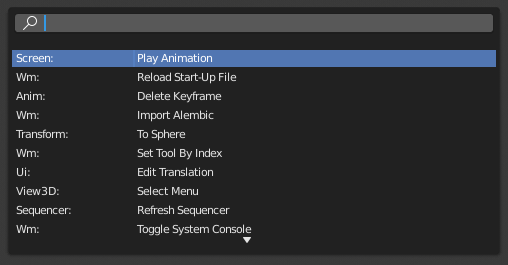
The Menu Search pop-up searches Blender's interface for a desired Operators and allows you to execute that operator. It displays a list of matches and shows which menu the operator was found in. Start typing the name of the operator you want to refine the list. When the list is sufficiently narrowed, LMB on the desired operator or navigate with Down and Up, run the selected operator by pressing Return.
../../../_images/interface_controls_templates_operator-search_pop-up.png

The Menu Search pop-up.

شاهد أيضا

The Spacebar Action option in the Preferences.

Operator Search

Reference

Mode

All Modes

Menu

Edit ‣ Operator Search

When Developer Extras are activated the Operator Search can be accessed from the Edit menu in the Topbar. This search menu search all Operators within Blender even if they are not exposed in a menu. This is useful for Python developers for testing purposes. Blender might also include a few advanced operators that are not exposed in a menu and can only be accessed via this search menu.

Previous Next

© حقوق النشر : This page is licensed under a CC-BY-SA 4.0 Int. License Last updated on 08/29/2022.

  • تعديل الصفحـة
  • Report issue on this page
  • 3.2
    Versions
    • Loading...
  • ar
    Languages
    • Loading...