Ограничитель «Ограничить вращение» (limit rotation constraint)
An object or bone can be rotated around the X, Y and Z axes. This constraint restricts the amount of allowed rotations around each axis, through lower and upper bounds.
It is interesting to note that even though the constraint limits the visual and rendered rotations of its owner, its owner’s data-block still allows (by default) the object or bone to have rotation values outside the minimum and maximum ranges. This can be seen in the Transform panel. When an owner is rotated and attempted to be rotated outside the limit boundaries, it will be constrained to those boundaries visually and when rendered, but internally, its rotation values will still be changed beyond the limits. If the constraint is removed, its ex-owner will seem to jump to its internally specified rotation.
Similarly, if its owner has an internal rotation that is beyond the limit, rotating it back into the limit area will appear to do nothing until the internal rotation values are back within the limit threshold (unless you enabled the Affect Transform option, see below).
Setting equal the min and max values of an axis, locks the owner’s rotation around that axis… Although this is possible, using the Transformation Properties axis locking feature is probably easier.
This transform does not constrain the bone if it is manipulated by the IK solver. For constraining the rotation of a bone for IK purposes, see Inverse Kinematics.
Опции (options)
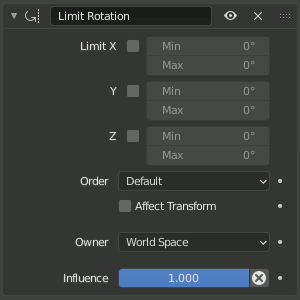
Панель ограничителя Limit Rotation.
- Ограничение по X, Y, Z (limit X, Y, Z)
Эти кнопки активируют ограничение вращения вокруг осей X, Y и Z владельца в выбранном пространстве „Owner“. Числовые поля Min и Max справа от них управляют значением их нижней и верхней границ соответственно.
Примечание
Если минимальное значение выше соответствующего ему максимального значения, – ограничитель будет вести себя так, как если бы минимум был тем же, что и максимальное значение.
В отличие от ограничителя Limit Location, вы не можете отдельно включать нижние или верхние пределы.
Ограничение можно использовать для простого удаления сдвига из трансформации владельца, оставив все лимиты отключёнными.
- Порядок (Order)
Allows specifying which Euler order to use when applying the limits. Defaults to the order of the owner.
- Влиять на трансформации (affect transform)
Ограничение будет учитываться и при вращении объекта вручную с использованием инструментов трансформации в редакторах. Это предотвращает применение тех значений свойств трансформации (это отображается на панели „Transform“), которые будут превышать указанные пределы.
- Владелец (owner)
Этот ограничитель позволяет вам выбирать, – в каком пространстве оценивать параметры трансформации его владельца. Для получения дополнительной информации см. раздел по общим свойствам ограничителей.
- Влияние (influence)
Управляет степенью влияния ограничителя на объект. Для получения дополнительной информации см. раздел по общим свойствам ограничителей.