Không Gian Làm Việc (Workspaces)
Workspaces are essentially predefined window layouts. Blender's flexibility with Areas lets you create customized workspaces for different tasks such as modeling, animating, and scripting. It is often useful to quickly switch between different workspaces within the same file.

Workspaces are located at the Topbar.
Điều Khiển (Controls)
- Thẻ Mục (Tabs)
Click on the tabs titles to switch between the workspaces. To cycle between workspaces use Ctrl-PageUp and Ctrl-PageDown. Double click to rename the workspace.
- Cộng Thêm
+ Click on the Add button to add a new workspace.
- Trình đơn Ngữ Cảnh NCP (RMB) (Context menu RMB)
The context menu contains options to duplicate, delete and reorder workspaces.
Không Gian Làm Việc mặc định (Default Workspaces)
Blender's default startup shows the "Layout" workspace in the main area. This workspace is a general workspace to preview your scene and objects and contains the following Trình Biên Soạn (Editors):
Phím Nóng trong Cổng Nhìn 3D.
Outliner on top right.
Properties on bottom right.
Lịch Trình Thời Gian Tự Động Khung Khóa Hóa.
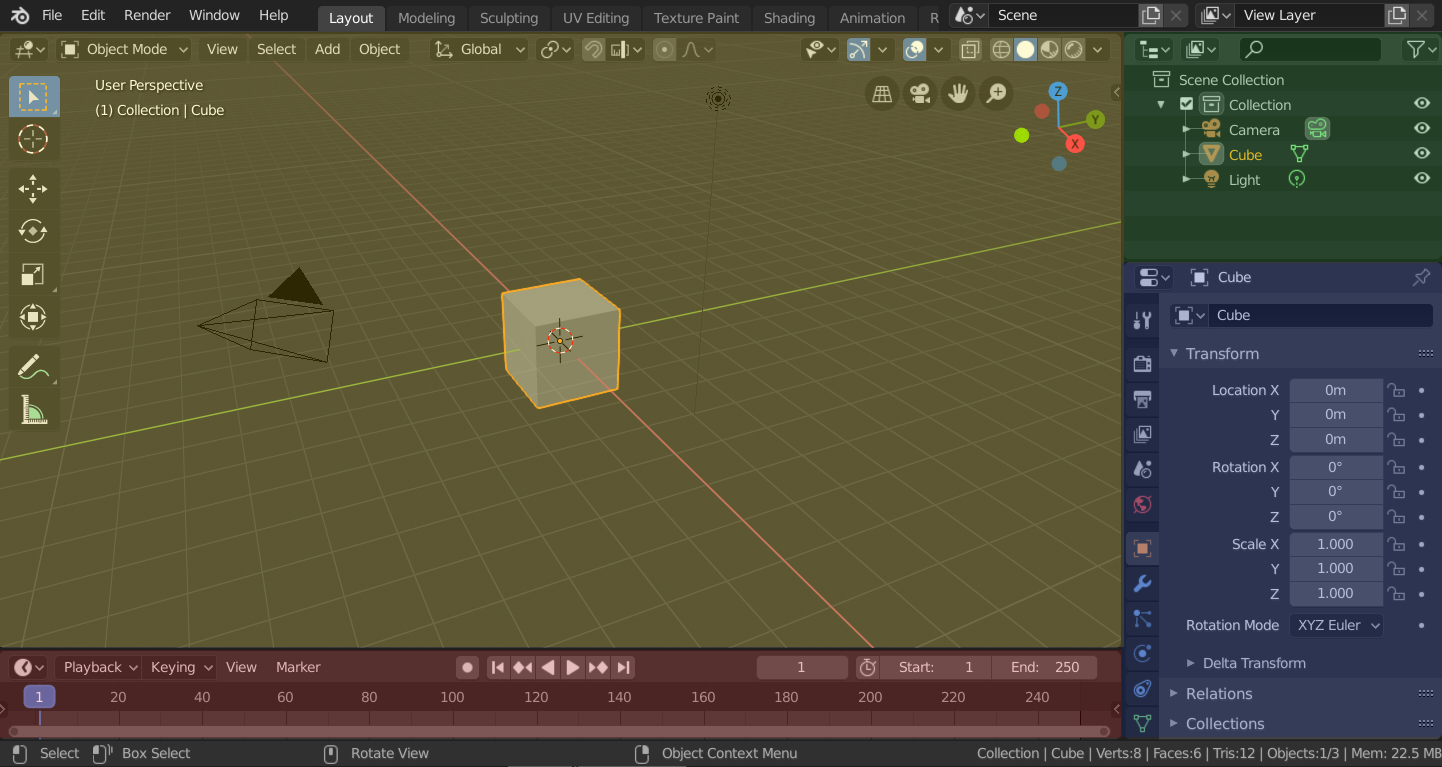
Blender's 'Layout' Workspace with four editors.
3D Viewport (yellow), Outliner (green), Properties (blue) and Timeline (red).
Blender also has several other workspaces added by default:
- Tạo Mô Hình (Modeling)
For modification of geometry by modeling tools.
- Điêu Khắc (Sculpting)
For modification of meshes by sculpting tools.
- Biên soạn UV (UV Editing)
For mapping of image texture coordinates to 3D surfaces.
- Sơn Chất Liệu (Texture Paint)
For coloring image textures in the 3D Viewport.
- Shading (Tô Bóng)
For specifying material properties for rendering.
- Animation (Hoạt Họa)
For making properties of objects dependent on time.
- Kết Xuất (Rendering)
For viewing and analyzing rendering results.
- Tổng Hợp (Compositing)
For combining and post-processing of images and rendering information.
- Các nút hình học (Geometry Nodes)
For procedural modeling using Các nút hình học (Geometry Nodes).
- Viết Tập Lệnh (Scripting)
For interacting with Blender's Python API and writing scripts.
Không Gian Làm Việc Bổ Sung (Additional Workspaces)
Blender has a couple additional Workspaces to choose from when adding a new Workspace:
hoạt họa 2D (2D Animation)
- hoạt họa 2D (2D Animation)
General workspace to work with Grease Pencil.
- Toàn Bộ Khung Vẽ 2D (2D Full Canvas)
Similar to "2D Animation" but contains a larger canvas.
VFX
- Chắn Lọc (Masking)
For creating 2D masks for compositing or video editing.
- Giám Sát Chuyển Động (Motion Tracking)
For calculation camera motion and stabilizing video footage.
Biên Soạn Phim Video (Video Editing)
- Biên Soạn Phim Video (Video Editing)
For sequencing together media into one video.
Lưu và Viết Đè (Save and Override)
The workspaces are saved in the blend-file. When you open a file, enabling the Load UI in the File Browser indicates that Blender should use the file's screen layouts and overriding the current layout. See Load UI.
A custom set of workspaces can be saved as a part of the Mặc Định (Defaults).
Các Sắp Đặt của Không Gian Làm Việc (Workspace Settings)
Tham Chiếu (Reference)
- Trình Biên Soạn (Editor)
Tính Chất (Properties)
- Trình Đơn (Menu)
- Chế Độ (Mode)
Switch to this Mode when activating the workspace.
Thanh Lọc Trình Bổ Sung (Filter Add-ons)
Filters which Add-ons are enabled in the active workspace. Keeping the checkbox in the header enables all global add-ons, enabling the checkbox allows you to individually enable add-ons from the list.