Blender 2.83 Manual Logo
  • Prise en main
  • Interface utilisateur
    • Écran d’accueil (Splash Screen)
    • Système de fenêtres
    • Configuration des touches du clavier
    • Contrôles de l’interface
      • Boutons et contrôles
      • Contrôles étendus
        • Menu data-block
        • Vues de listes et préréglages
        • Sélecteur de couleurs
        • Widget Color Ramp
        • Palette de couleurs
        • Gestionnaire de courbe (Curve Widget)
        • Recherche d’opérateur
        • Nodes
    • Outils
  • Éditeurs
  • Scènes et objets
  • Modélisation
  • Sculpting & Painting
  • Grease Pencil
  • Animation et rigging
  • Physique
  • Rendu
  • Composition
  • Tracking & Masking
  • Édition vidéo
  • Fichiers et système de données
  • Add-ons
  • Utilisation avancée
  • Résolution de problèmes
  • Glossaire
  • Contribute Documentation
Blender 2.83 Manual
  • »
  • Interface utilisateur »
  • Nodes »
  • Sidebar

Sidebar

Item

Reference

Panel

Sidebar region ‣ Item

../../../_images/interface_controls_nodes_sidebar_item.png

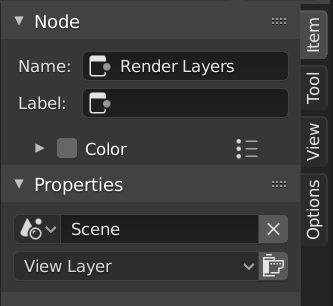
Item tab with a compositing Render Layers node selected.

Node

Name

A unique node identifier inside this node tree.

Label

Nodes can be given a title by modifying the text field.

Color

Color Presets

Colors saved as a preset for reuse in other nodes.

Color

Color of the node background. Node colors can be used to provide a visual cue.

Properties

The properties that are shown depend on the type of node selected, e.g. a Mix node has different properties than a Mask node.

Tool

Reference

Panel

Sidebar region ‣ Tool

Active Tool

The info in this panel changes with the selected tool.

View

Reference

Panel

Sidebar region ‣ View

Annotations

You can select the Annotate tool in the Toolbar to make annotations in the node editor. See Annotate Tool for more info.

Next Previous

© Copyright : This page is licensed under a CC-BY-SA 4.0 Int. License

  • Edit Page
  • Report Bug
  • 2.83
    • Loading...
  • fr
    • Loading...