Раскладка (keymap)
The keymap editor lets you adjust your keymap via:
- Пресеты (presets):
Predefined keymaps which come with Blender and can be added to.
- Настройки (preferences):
Keymaps may define their own preferences to change the functionality or add additional key bindings.
- Key Map Items:
You may add/remove/edit individual keymap entries.
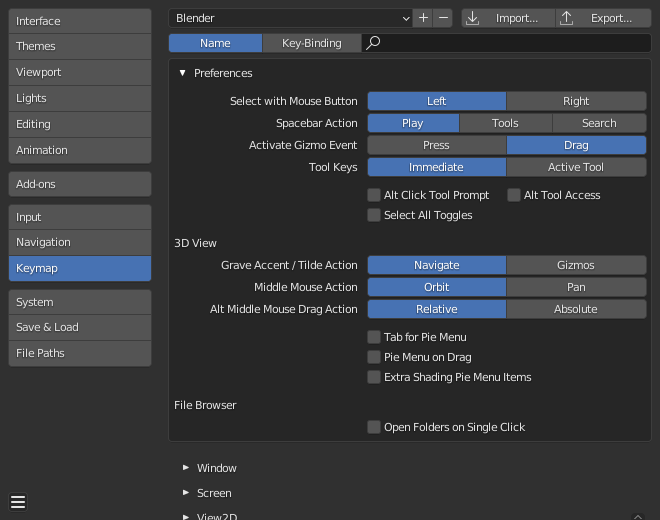
Раздел «Keymap» в настройках Blender’а.
Preset Management
- Пресеты раскладок
Select the keymap from a list of predefined keymaps.
- Импортировать (import)
Importing opens a File Browser to select a
.pyfile to add to the list of keymap presets.- Экспортировать (export)
Сохраняет текущую конфигурацию раскладки в качестве пресета, который могут использовать и другие.
- Список всех раскладок клавиатуры (all keymaps)
When disabled, only the keymaps and categories that have been modified by the user will be exported. In addition, add-ons may register keymaps to their respective functions, however, these keymaps are not exported unless changed by the user. This exported file may be thought of as a «keymap delta» instead of a full keymap export.
При включении, – записывается вся раскладка.
Фильтрация
- Тип фильтра (filter type)
- Имя (name)
Search the keymap item by the operator name it runs.
- Сочетание клавиш (key binding)
Search the keymap item by the key used to activate it.
Подсказка
You could for example search with
Ctrl Shift Cfor keymap items that use all these keys.
- Поиск (search)
The text to search (leave blank to disable).
Настройки (preferences)
Keymaps may define their own preferences, these are predefined adjustments to the keymap you can make without having to manually adjust individual keymap items which can cause problems with newer Blender Versions.
See the default keymap preferences for options available in the default keymap.
Редактор
The Keymap editor lets you change the default hotkeys. You can change keymaps for each of Blender’s editors.
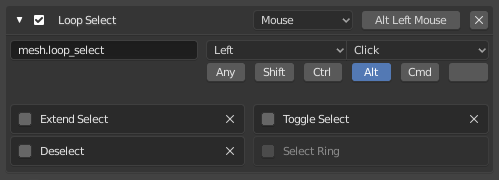
Редактор раскладки клавиатуры.
Использование
Select the keymap you want to change and click on the white arrows to open up the keymap tree.
Select which Input will control the function.
Change hotkeys as you want. Just click on the shortcut input and enter the new shortcut.
- Активный (active)
Uncheck to disable this keymap item.
- Тип раскладки (map type)
- Клавиатура (keyboard)
Одна горячая клавиша или комбинация клавиш.
- Мышка (mouse)
Действия с помощью кнопок мышки, ввода с планшета или сенсорной панели.
- NDOF
Movement from a 3D mouse (NDOF) device.
- Подстройка (tweak)
Щелчок мышки и её перетаскивание (при желании можно сопоставить направление перетаскивания с различными действиями).
- Ввод текста (text input)
Использовать эту функцию, вводя текст.
- Таймер (timer)
Used to control actions based on a time period. E.g. by default, Animation Step uses «Timer 0», Smooth View uses «Timer 1».
- Имя ID оператора
Идентификатор для вызова оператора.
Подсказка
См.
bpy.opsдля списка операторов (удалите префиксbpy.для идентификатора).- Событие
- Тип (type)
Клавиша или кнопка, активирующая данный элемент раскладки (в зависимости от типа раскладки).
- Значение (value)
Действие (например, нажатие, отпускание, щелчок, перетаскивание и т. д.), (в зависимости от типа раскладки).
- Модификатор (modifier)
Дополнительные клавиши для удержания (например, Ctrl, Shift, Alt).
- Свойства оператора
Changes to the defaults properties this operator is activated with
См.также
Раздел «Настройка раскладки клавиатуры» для получения дополнительной информации о редактировании раскладки клавиатуры.
Восстановление
Если вы хотите восстановить настройки „по умолчанию“ для раскладки клавиатуры – просто нажмите кнопку „Restore“ в правом верхнем углу этой раскладки.
Совет
Instead of deleting the default keymap to create your custom one, you can just add a new Preset for both the mouse and keyboard.
Известные ограничения
Версии Blender’а
A problem with modifying your own keymap is newer Blender versions key change the way tools are accessed, breaking your customized keymap.
Хотя раскладку можно обновлять вручную, но помните – чем больше настроек вы вносите, тем выше вероятность конфликтов в новых версиях Blender’а.