Kế Đo Lường -- Scopes
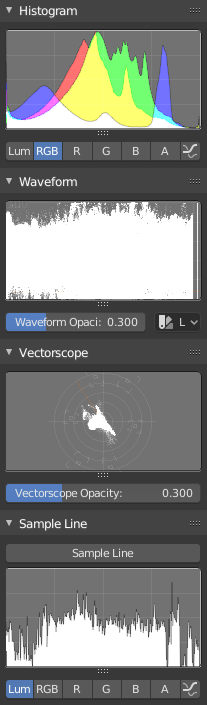
Scopes in the Image editor.
Biểu Đồ Ánh Sáng -- Histogram
This mode displays a graph showing the distribution of color information in the pixels of the currently displayed image. The X axis represents values of pixel, from 0 to 1 (or 0 to 255), while the Y axis represents the number of pixels in that tonal range. A predominantly dark image would have most of its information toward the left side of the graph.
Use this mode to balance out the tonal range in an image. A well balanced image should have a nice smooth distribution of color values.
- Độ Sáng -- Luma
Shows the luminosity of an image.
- Đỏ, Lục, Lam -- RGB
Shows the RGB channels stacked on top of each other.
- Đỏ/Lục/Lam/Alpha -- R/G/B/A
Depending on the channel you choose the scope will show the appropriate channel.
- Hiển Thị Đường Nét -- Show line
Hiển thị các đường nét thay vì các hình có bề mặt phủ kín.
Hình Sóng -- Waveform
- Độ Đục của Hình Sóng -- Waveform Opacity
Opacity of the points.
- Chế Độ Hình Sóng -- Waveform Mode
- Độ Sáng -- Luma
Nội dung cần viết thêm.
- YCbCr
Nội dung cần viết thêm.
- Diễu Hành -- Parade
The RGB channels are shown side-by-side.
- Đỏ Lục Lam -- Red Green Blue
Shows the RGB channels overlaid as a "Full color" waveform. It is useful for color grading.
Vectơ Kế -- Vectorscope
- Độ Đục của Vectơ Kế -- Vectorscope Opacity
Opacity of the points.
Lấy Mẫu Vật về Đường Vẽ -- Sample Line
The Sample Line scope is the same as the Histogram but allows you to get the sample data from a line.
- Lấy Mẫu Vật về Đường Vẽ -- Sample Line
Used to draw a line to use to read the sample data from.
Mẫu Vật cho Kế Đo Lường -- Scope Samples
- Lấy Mẫu Vật Toàn Phần -- Full Sample
Sample every pixel.
- Độ Chính Xác -- Accuracy
Proportion of original image source pixel lines to sample.