Split Node
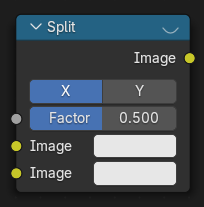
The Split node combines two images for side-by-side display. Typically used in combination with the Viewer Node.
Inputs
- Factor
Percentage factor setting the space distribution between the two images.
- Image
Shown on the right or top half set by the axis.
- Image
And respectively the left or bottom half.
Properties
- Axis
X or Y used as the split axis.
Outputs
This node has no output sockets.
Hint
This node could be used to plan scene transitions by comparing the end frame of one scene with the start frame of another to make sure they align.
Usage
The Split node supports an interactive gizmo in the node editor. To enable it, make sure Active Node gizmo is enabled, and select the Split node in the Compositor.
The gizmo allows direct manipulation of the split Factor by dragging the line horizontally/vertically:
Examples

Example of a Split Viewer node.