Blender 2.80 Manual Logo
  • Prise en main
  • Interface utilisateur
    • Écran d’accueil (Splash Screen)
    • Système de fenêtres
    • Keymap
    • Contrôles de l’interface
      • Boutons et contrôles
      • Contrôles étendus
        • Menu data-block
        • Vues en liste et préréglages
        • Sélecteur de couleurs
        • Widget Color Ramp
        • Gestionnaire de courbe (curve widget)
        • Recherche d’opérateur
        • Nodes
    • Outils
  • Éditeurs
  • Scenes & Objects
  • Modélisation
  • Sculpting & Painting
  • Grease Pencil
  • Animation & Rigging
  • Physique
  • Rendering
  • Composition
  • Tracking & Masking
  • Video Editing
  • Files & Data System
  • Add-ons
  • Utilisation avancée
  • Résolution de problèmes
  • Glossaire
  • À propos de ce manuel
Blender 2.80 Manual
  • Docs »
  • Interface utilisateur »
  • Recherche d’opérateur
  • View page source

Recherche d’opérateur

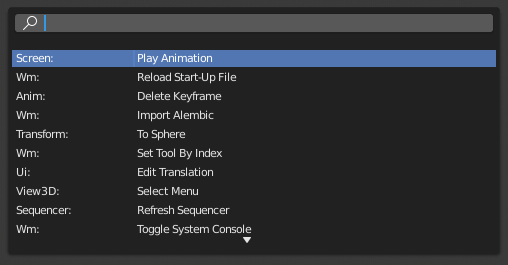
A pop-up menu with access to all Blender tools is available by pressing F3. Simply start typing the name of the tool you want to refine the list. When the list is sufficiently narrowed, LMB on the desired tool or navigate with Down and Up, activate it by pressing Return.
../../../_images/interface_controls_templates_operator-search_pop-up.png

Le menu operator search.

Voir aussi

The Spacebar Action option in the Preferences.

Next Previous

© Copyright : This page is licensed under a CC-BY-SA 4.0 Int. License

  • 2.80
    • Loading...
  • fr
    • Loading...