Stabilize 2D Node
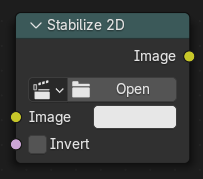
Stabilizes the footage according to the settings set in . For more information, see 2D Stabilization.
Ingressi
- Immagine
Standard color input.
- Inverti
Invert the stabilization. If the stabilization calculated is to move the movie clip up by 5 units, this will move the movie clip down by 5 units.
Campionatura
- Filtra
Determines how pixel values are interpolated when scaling or transforming images.
- Nearest:
Uses the value of the closest pixel with no smoothing. This is the fastest method and is well-suited for pixel art or low-resolution images where sharp, blocky edges are desirable. In animations, motion appears in single-pixel steps, which can cause visible jittering.
- Bilinear:
Averages the values of surrounding pixels to create a smoother result than Nearest. Provides a good balance between performance and visual quality.
- Bicubic:
Computes a weighted average of a larger neighborhood of pixels for even smoother results. Ideal for photographic images or gradients where preserving fine detail is important.
- Anisotropic:
Adjusts interpolation based on the direction and scale of the transformation. Helps reduce blurring or aliasing when scaling at steep angles or uneven resolutions, especially useful in textures viewed at oblique angles or in detailed 3D projections.
Proprietà
- Filmato
The movie clip whose stabilization to use.
Uscite
- Immagine
Standard color input.