Blender 2.92 Manual Logo
  • 블렌더 시작하기
  • 화면(UI)
    • 화면 구조
    • Keymap
    • 화면 조작
      • 버튼
      • 기타
        • 데이터블록 메뉴(data-block menu)
        • 목록(list view), 프리셋(preset)
        • 색깔 선택기(color picker)
        • 그러데이션 위젯(color ramp widget)
        • Color Palette
        • 곡선 위젯(curve widget)
        • Search
        • Nodes
          • Introduction
          • Node Parts
          • Selecting
          • Arranging Nodes
          • Editing
          • Sidebar
            • Item
              • Node
                • Color
              • Properties
            • Tool
              • Active Tool
            • View
              • Annotations
          • Node Groups
          • Frame Node
          • Reroute Node
    • 도구
  • 편집기(editor)
  • Scenes & Objects
  • 모델링
  • Sculpting & Painting
  • Grease Pencil
  • Animation & Rigging
  • 물리법칙
  • Rendering
  • 합성하기(compositing)
  • Motion Tracking & Masking
  • Video Editing
  • Files & Data System
  • 애드온(add-on)
  • 고급 기능
  • 문제 해결하기
  • 용어 사전
  • Contribute Documentation
Blender 2.92 Manual
  • »
  • 화면(UI) »
  • Nodes »
  • Sidebar

Sidebar

Item

Reference

Panel

Sidebar region ‣ Item

../../../_images/interface_controls_nodes_sidebar_item.png

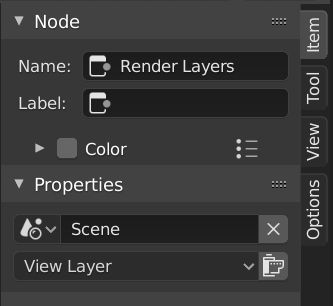
Item tab with a compositing Render Layers node selected.

Node

Name

A unique node identifier inside this node tree.

Label

Nodes can be given a title by modifying the text field.

Color

Color Presets

Colors saved as a preset for reuse in other nodes.

Color

Color of the node background. Node colors can be used to provide a visual cue.

Properties

The properties that are shown depend on the type of node selected, e.g. a Mix node has different properties than a Mask node.

Tool

Reference

Panel

Sidebar region ‣ Tool

Active Tool

The info in this panel changes with the selected tool.

View

Reference

Panel

Sidebar region ‣ View

Annotations

You can select the Annotate tool in the Toolbar to make annotations in the node editor. See Annotate Tool for more info.

Next Previous

© 저작권 : This page is licensed under a CC-BY-SA 4.0 Int. License 최종 업데이트: 02/25/2021

  • Edit Page
  • Report Bug
  • 2.92
    • Loading...
  • ko
    • Loading...