Blender 3.0 Manual Логотип
  • Начало работы
  • Интерфейс пользователя
    • Система окон
    • Горячие клавиши
    • Элементы управления интерфейсом
      • Кнопки, различные элементы управления
      • Продвинутые элементы управления
        • Меню блока данных
        • List View
        • Выбор цвета
        • Виджет цветовой шкалы
        • Палитра цвета
        • Виджет кривых
        • Поиск
        • Ноды (узлы)
          • Введение
          • Node Parts
          • Выбор
          • Arranging Nodes
          • Редактирование
          • Боковая панель
            • Node
              • Node
                • Color
              • Свойства
            • Tool
              • Active Tool
            • Вид (View)
              • Annotations
          • Node Groups
          • Frame Node
          • Reroute Node
    • Инструменты
  • Редакторы
  • Scenes & Objects
  • Моделирование
  • Sculpting & Painting
  • Grease Pencil
  • Animation & Rigging
  • Physics
  • Rendering
  • Compositing
  • Motion Tracking & Masking
  • Видео-редактирование
  • Assets, Files, & Data System
  • Дополнения (Add-ons)
  • Расширения
  • Решение проблем
  • Словарь
  • Contribute Documentation
Blender 3.0 Manual
  • »
  • Интерфейс пользователя »
  • Ноды (узлы) »
  • Боковая панель

Боковая панель

Node

Справка

Panel

Sidebar ‣ Node

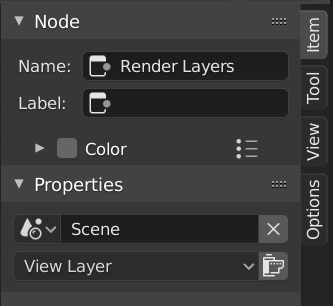
../../../_images/interface_controls_nodes_sidebar_item.png

Node tab with a compositing Render Layers node selected.

Node

Имя

A unique node identifier inside this node tree.

Label

Nodes can be given a title by modifying the text field.

Color

By default, the nodes background color is defined by the user theme. This color can be overridden by selecting a custom color in this panel. Custom node colors can be used to provide a visual cue to help distinguish some nodes from others. In the panel header, colors can be saved as a preset for reuse in other nodes or other projects.

Color

Color of the node background.

Node Color Specials

This menu contains operators for working with nodes with custom colors.

Copy Color

Copies the color of the Active node and applies it to all selected nodes.

Свойства

The properties that are shown depend on the type of node selected, e.g. a Mix node has different properties than a Mask node.

Tool

Справка

Panel

Sidebar region ‣ Tool

Active Tool

The info in this panel changes with the selected tool.

Вид (View)

Справка

Panel

Sidebar region ‣ View

Annotations

You can select the Annotate tool in the Toolbar to make annotations in the node editor. See Annotate Tool for more info.

Предыдущая Следующая

© Copyright : This page is licensed under a CC-BY-SA 4.0 Int. License. Обновлено: 01/28/2022.

  • Edit Page
  • Report Bug
  • 3.0
    Versions
    • Loading...
  • ru
    Languages
    • Loading...