Úvodná obrazovka
When starting Blender, the splash screen appears in the center of the window. It contains options to create new projects or open recently opened blend-files. A more detailed description can be found below.
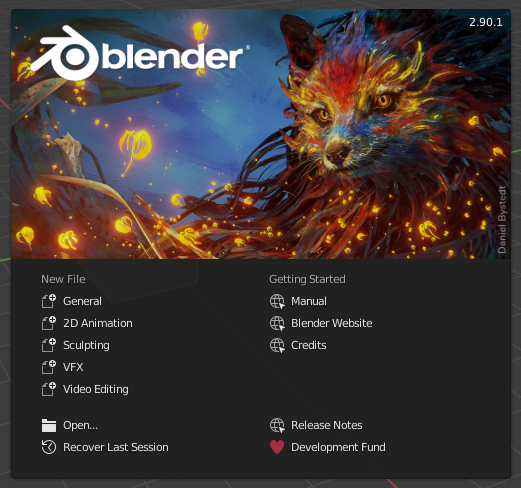
Úvodná obrazovka Blendera.
To close the splash screen and start a new project, click anywhere outside the splash screen (but inside the Blender window) or press Esc. The splash screen will disappear revealing the default screen. To reopen the splash screen click on the Blender icon in the Topbar and select Splash Screen.
- Informačná oblasť
Horná časť úvodnej obrazovky obsahuje úvodný obrázok s verziou Blender vpravo hore.
- Interaktívna oblasť
Interaktívna oblasť je spodná polovica úvodnej obrazovky.
- Nový súbor
Zaháji nový projekt založený na šablóne.
- Nedávne súbory
Vaše nedávno otvorené blend súbory. To umožňuje rýchly a ľahký prístup k vašim nedávnym projektom.
- Otvoriť
Povolí otvorenie existujúceho blend súboru.
- Obnoviť poslednú reláciu
Blender will try to recover the last session based on temporary files. See Obnovenie údajov.
- Odkazy
Odkazy na oficiálnu webovú stránku. Rovnaké odkazy nájdete na Ponuka Pomoc na hornom paneli.
Poznámka
Pri prvom spustení Blenderu obsahuje Interaktívna oblasť Proces rýchleho nastavenia.