运算
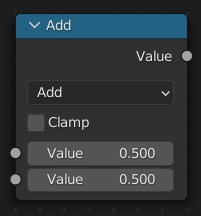
The Math Node performs one of over 40 math operations on its inputs. It is one of the most frequently used utility nodes in shader, compositing, and geometry node setups — used for everything from adjusting texture brightness to creating procedural masks and patterns.
The node's input sockets change dynamically depending on the selected operation. Only the sockets relevant to the current operation are shown.
输入
The inputs are dynamic: they appear only when needed by the selected operation.
- 数值
Numeric input. Most operations use one or two values, shown as separate Value sockets in the interface. Trigonometric functions interpret this value as radians.
- 乘数
The multiplier for Multiply Add. The input value is multiplied by this before Addend is added.
- 加数
An extra value added after multiplication. Used only by Multiply Add.
- 基础(基数)
The base value for operations like Power and Logarithm.
- 指数
The exponent for Power.
- 阈值
The comparison threshold for Less Than and Greater Than. The output is 1.0 when the first value passes this threshold, 0.0 otherwise.
- ε
The tolerance threshold for Compare. Smaller values require closer matches.
- 距离
The distance for Smooth Minimum and Smooth Maximum. Larger values create a wider blending zone between the two inputs.
- 最小值
The lower bound for Wrap. Values will not go below this.
- 最大值
The upper bound for Wrap. Values will be wrapped back into range when they exceed this.
- 增量
The step size for Snap. The output will be rounded to multiples of this value.
- 缩放
The maximum value for Ping-Pong. The output bounces between 0.0 and this value.
- 角度
Input angle in degrees for the To Radians conversion.
- 弧度
Input angle in radians for the To Degrees conversion.
属性
- 运算
The mathematical operator to be applied to the input values.
- 函数
Basic arithmetic operations for scaling, offsetting, and combining values.
- 相加:
将运算符两侧的数值进行加法运算。
- 相减:
对两侧的输入值进行减法运算。
- 正片叠底(相乘):
The product of the two values. Multiplying by a value between 0 and 1 darkens; values above 1 brighten.
- 相除:
第一个值除以第二个值。除以零的结果为零。
- 乘后再加:
Computes \(A × B + C\). Useful for scaling a value then adding an offset in a single node.
- 能量(乘方):
The Base raised to the power of Exponent. Values above 1 steepen the curve; values below 1 flatten it.
- 对数:
以 基数 为基数的值的对数。
- 平方根:
求输入值的平方根。
- 平方根取倒:
即用数字1除以一个数值的平方根所得的结果。
- 绝对:
Outputs the value without regard to its sign, turning negative values into positive ones. Commonly used to convert signed noise (e.g. -1.0 to 1.0) into an unsigned range (0.0 to 1.0) suitable for use as a factor input.
- 指数:
Raises Euler's number (\(e\)) to the power of the value.
- 比较
Operations that compare two values or produce a 0 or 1 output. These are often used to create masks, thresholds, and conditional branching in node graphs.
- 最小值:
Outputs the smaller of the two values.
- 最大值:
Outputs the larger of the two values.
- 小于:
Outputs 1.0 when the first value is smaller, and 0.0 otherwise. Useful for creating threshold masks.
- 大于:
Outputs 1.0 when the first value is larger, and 0.0 otherwise. Useful for creating threshold masks.
- 符号:
Outputs 1.0 for positive values, -1.0 for negative, and 0.0 for exactly zero.
- 比较:
Outputs 1.0 when the two values are within Epsilon of each other. Increase Epsilon to widen the match tolerance.
- 平滑最小值:
Like Minimum, but blends smoothly between the two values when they are close together. The blend width is controlled by the Distance input. Useful for blending height maps or terrain without visible seams.
- 平滑最大值:
Like Maximum but with a smooth transition controlled by Distance.
- 圆滑(舍入)
Operations that change a value by snapping, wrapping, or extracting components. These are essential for creating repeating patterns, quantization effects, and cyclic motion.
- 圆(四舍五入):
Rounds to the nearest integer, rounding 0.5 upward.
- 基面:
Rounds down to the nearest integer. For negative numbers, this moves away from zero (e.g. -1.3 becomes -2.0).
- 向上取整:
Rounds up to the nearest integer.
- 截断:
Removes the fractional part without rounding (e.g. 3.7 becomes 3.0, -3.7 becomes -3.0).
- 分数:
Returns only the fractional part (e.g. 3.7 becomes 0.7). Useful for creating repeating gradients.
- 截断取模:
Outputs the remainder of dividing the first value by the second, preserving the sign of the first value.
- 向下取模:
Outputs a positive remainder, even for negative inputs. Use this when you need the result to stay in the [0, divisor) range.
- 循环:
Wraps the input value so it stays between Min and Max in a repeating loop. When the value passes Max, it wraps back to Min, and vice versa. Works like a sawtooth wave — useful for tiling, repeating patterns, and cyclic animations.
- 吸附:
Rounds the value down to the nearest multiple of Increment. Use for quantization or grid-alignment effects. Note that this uses floor rounding (towards negative infinity), not rounding to the nearest multiple.
- 乒–乓:
Bounces the value back and forth between 0.0 and Scale like a ball. As the input increases, the output rises to Scale then falls back to 0.0, repeating. Useful for back-and-forth animation and folding patterns.
- 三角函数
Sine, cosine, and tangent functions. The input is always in radians. Commonly used for wave patterns, circular gradients, and angle calculations.
- 正弦:
The sine of the input. Output oscillates between -1.0 and 1.0.
- 余弦:
The cosine of the input. Same as sine but shifted by \(\pi/2\).
- 切向 (正切):
The tangent of the input. Approaches infinity near \(\pi/2 + n \cdot \pi\). Results may be unstable or produce artifacts near these points.
- 反正弦:
The inverse sine. Returns an angle in radians in the range \([-\pi/2, \pi/2]\).
- 反余弦:
The inverse cosine. Returns an angle in radians in the range \([0, \pi]\).
- 反正切:
The inverse tangent. Returns an angle in radians in the range \([-\pi/2, \pi/2]\).
- 反正切2:
The two-argument arctangent. Given Y and X coordinates, returns the angle from the positive X-axis. This is the correct way to calculate the angle of a 2D vector, since it preserves quadrant information that single-argument arctangent loses. The first Value input corresponds to Y, the second to X.
- 双曲正弦:
The hyperbolic sine of the input.
- 双曲余弦:
The hyperbolic cosine of the input.
- 双曲正切:
The hyperbolic tangent of the input.
- 转换
Simple unit conversions between degree and radian angle representations.
- 到弧度:
Converts the input from degrees to radians (multiplies by \(\pi/180\)).
- 到角度:
Converts the input from radians to degrees (multiplies by \(180/\pi\)).
- 钳制
限定输出数值的范围(0.0 到 1.0)。参见钳制。
输出
- 数值
数值输出。
示例
Scaling and Offsetting a Texture Value
Texture nodes like Noise Texture output values in a fixed range (typically 0.0 to 1.0). To adjust the contrast and brightness of such values, chain two Math nodes:

Noise texture with no scaling.¶ |

Noise scaled by Multiply (×2).¶ |

Two nodes: Multiply (×2) then Add (-1).¶ |

One node: Multiply Add (Mult=2, Addend=-1).¶ |
Multiply to scale the range (e.g. multiply by 2.0 to expand to 0.0–2.0, or 0.5 to compress to 0.0–0.5).
Add to shift the range (e.g. add -1.0 after multiplying by 2.0 to get -1.0 to 1.0).
The Multiply Add operation combines both steps into a single node: \(\text{Value} × \text{Multiplier} + \text{Addend}\).
Creating a Threshold Mask
Use Greater Than or Less Than to create a hard-edged mask:


Connect a Noise Texture (Factor output) to the first Value.
Set the second Value to a threshold (e.g. 0.5).
The output will be 1.0 wherever the noise is above the threshold, and 0.0 below.
To get a softer transition, chain the result through Mix or Map Range after the comparison, or use Smooth Minimum and Smooth Maximum for soft blending between values.
Blending Height Maps
When combining two height maps (e.g. from different noise textures), Smooth Minimum creates a seamless blend that looks like natural terrain erosion:


Connect two height sources to the two Value inputs.
Set the Distance to control how wide the blend zone is.
A small Distance gives sharp creases; a larger value creates gentle valleys.
Repeating a Pattern with Wrap
Wrap forces any increasing value to cycle back between Min and Max in a repeating loop, creating a sawtooth-like output. This is useful for driving procedural patterns and gradients that repeat automatically as the input increases:

Multiply only — values beyond 1.0 are clamped, no repetition.¶ |

Multiply then Wrap — values cycle back, creating repeating bands.¶ |
Connect a Texture Coordinate node's X axis (via Separate XYZ) to the Value input.
Set Min = 0.0 and Max = 1.0. Multiply the axis value first to control how many repeats appear across the surface (e.g. ×5.0 for five cycles).
Connect the output to a Color Ramp set to black and white to see the repeating bands.
示例
自定义Z深度通道节点设置

最大值与最小值功能举例。
The top Render Layers node has a cube that is about 10 units from the camera. The bottom Render Layers node has a plane that covers the left half of the view and is 7 units from the camera. Both are fed through their respective Map Value nodes to multiply the depth value by 0.05 and clamp it to [0.0, 1.0], bringing it into a suitable range for displaying it as a color.
The Minimum node selects the smallest of the two depth values at each pixel. In the left half, it chooses the plane (because it's closer than the cube), and in the right half, it chooses the cube (because it's closer than the background, which is infinitely far away).
The Maximum node selects the largest of the two depth values at each pixel. In the left half, it chooses the cube (because it's farther away than the plane), and in the right half, it chooses the background (because it's farther away than the cube).
使用正弦功能得到不断循环的变化数

使用正弦功能举例。
范例中采用一个 时间 节点,其时间范围从 1 到 101 之间。在第 25 帧,输出为 0.25.此数值转为由 2 × pi (6.28) 进行相乘运算并由正弦函数转换映射到 1.0 范围,用数学公式表示为 \(sin(2 × pi/ 4) = sin(pi/ 2) = +1.0\).
由于正弦函数可以输出介于 -1.0 到 1.0 之间的值,映射值 节点通过将输入值(-1 到 1)加 1(使 0 到 2),然后将结果乘以 0.5(从而将输出值缩放为 0 到 1),将其缩放为 0.0 到 1.0.默认的 颜色渐变 会将这些值转换为灰度。因此,中灰对应于正弦输出的 0.0,黑色对应于 -1.0,白色对应于 1.0.如您所见,\(sin(pi/ 2) = 1.0\).就像拥有了自己的可视化颜色计算器!将此节点设置为动画,可在灰度范围内实现平滑的循环序列。
将这个功能引申,比如,图片的 alpha 通道形成渐入/渐出特效。改变Z深度通道的景深位置。改变颜色通道值使其有规律的进行色彩变化。
提亮(缩放)通道

比例缩放单一通道范例。
本例中的 运算(相乘) 节点增加了图像的亮度通道(Y),使图像更加明亮。请注意,您应该使用一个 映射值节点,并启用最大值和最小值,以便将输出限制在有效值范围内。通过这种方法,您可以使用对数函数来制作高动态范围图像。在这个特定的范例中,还有一个 亮度/对比度节点,可以更简单地控制亮度。