Split Node
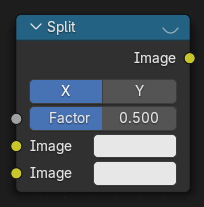
The Split node combines two images for side-by-side display. Typically used in combination with the Viewer Node.
Ingressi
- Fattore
Fattore percentuale che imposta la distribuzione dello spazio tra le due immagini.
- Immagine
Indicato sulla metà destra o superiore impostata dall’asse.
- Immagine
E rispettivamente la metà sinistra o inferiore.
Proprietà
- Asse
X o Y utilizzati come asse di divisione.
Uscite
Questo nodo non ha connettori d’uscita.
Suggerimento
This node could be used to plan scene transitions by comparing the end frame of one scene with the start frame of another to make sure they align.
Uso
The Split node supports an interactive gizmo in the node editor. To enable it, make sure Active Node gizmo is enabled, and select the Split node in the Compositor.
The gizmo allows direct manipulation of the split Factor by dragging the line horizontally/vertically:
Esempi

Esempio di un nodo Dividi Visualizzatore.