Blender 2.81 Manual Logo
  • 블렌더 시작하기
  • 화면(UI)
    • 시작화면
    • 화면 구조
    • Keymap
    • 화면 조작
      • 버튼
      • 기타
        • 데이터블록 메뉴(data-block menu)
        • 목록(list view), 프리셋(preset)
        • 색깔 선택기(color picker)
        • 그러데이션 위젯(color ramp widget)
        • 곡선 위젯(curve widget)
        • 명령어 검색
        • Nodes
    • 도구
  • 편집기(editor)
  • Scenes & Objects
  • 모델링
  • Sculpting & Painting
  • Grease Pencil
  • Animation & Rigging
  • 물리법칙
  • Rendering
  • 합성하기(compositing)
  • Tracking & Masking
  • Video Editing
  • Files & Data System
  • 애드온(add-on)
  • 고급 기능
  • 문제 해결하기
  • 용어 사전
  • 이 사용설명서에 대해서
Blender 2.81 Manual
  • Docs »
  • 화면(UI) »
  • 명령어 검색
  • View page source

명령어 검색

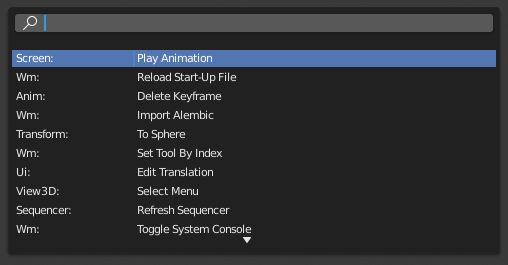
A pop-up menu with access to all Blender tools is available by pressing F3. Simply start typing the name of the tool you want to refine the list. When the list is sufficiently narrowed, LMB on the desired tool or navigate with Down and Up, activate it by pressing Return.
../../../_images/interface_controls_templates_operator-search_pop-up.png

명령어 검색 메뉴

더 보기

The Spacebar Action option in the Preferences.

Next Previous

© Copyright : This page is licensed under a CC-BY-SA 4.0 Int. License

  • 2.81
    • Loading...
  • ko
    • Loading...