Blender 2.90 Manual Logo
  • Почин – Getting Started
  • Інтерфейс Користувача – User Interface
    • Екран Заставки – Splash Screen
    • Система Вікон – Window System
    • Розкладка клавіш – Keymap
    • Керувальники інтерфейсу – Interface Controls
      • Кнопки й Керувальники – Buttons and Controls
      • Просунуті Керувальники – Extended Controls
        • Меню Блоку Даних – Data-Block Menu
        • Огляди Списком і Передустави – List Views & Presets
        • Підбирач Кольору – Color Picker
        • Віджет Градієнта Кольорів – Color Ramp Widget
        • Color Palette
        • Віджет Кривої – Curve Widget
        • Search
        • Nodes – Вузли
          • Вступ – Introduction
          • Частини Вузла – Node Parts
          • Вибирання – Selecting
          • Упорядкування Вузлів – Arranging Nodes
          • Редагування – Editing
          • Sidebar
            • Item
              • Node
                • Color
              • Properties
            • Tool
              • Active Tool
            • View
              • Annotations
          • Групи Вузлів – Node Groups
          • Вузол «Кадр» – Frame Node
          • Вузол «Розводка» – Reroute Node
    • Засоби – Tools
  • Редактори – Editors
  • Сцени та Об’єкти – Scenes & Objects
  • Моделювання – Modeling
  • Ліплення і Малювання – Sculpting & Painting
  • Нарисний Олівець – Grease Pencil
  • Анімація та Оснащування – Animation & Rigging
  • Фізика – Physics
  • Рендеринг – Rendering
  • Компонування – Compositing
  • Відстежування та Маскування – Tracking & Masking
  • Редагування Відео – Video Editing
  • Файли та Система Даних – Files & Data System
  • Додатки – Add-ons
  • Просунуте – Advanced
  • Усунення несправностей – Troubleshooting
  • Глосарій – Glossary
  • Contribute Documentation
Blender 2.90 Manual
  • »
  • Інтерфейс Користувача – User Interface »
  • Nodes – Вузли »
  • Sidebar

Sidebar

Item

Reference

Panel

Sidebar region ‣ Item

../../../_images/interface_controls_nodes_sidebar_item.png

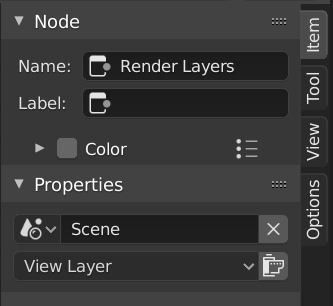
Item tab with a compositing Render Layers node selected.

Node

Name

A unique node identifier inside this node tree.

Label

Nodes can be given a title by modifying the text field.

Color

Color Presets

Colors saved as a preset for reuse in other nodes.

Color

Color of the node background. Node colors can be used to provide a visual cue.

Properties

The properties that are shown depend on the type of node selected, e.g. a Mix node has different properties than a Mask node.

Tool

Reference

Panel

Sidebar region ‣ Tool

Active Tool

The info in this panel changes with the selected tool.

View

Reference

Panel

Sidebar region ‣ View

Annotations

You can select the Annotate tool in the Toolbar to make annotations in the node editor. See Annotate Tool for more info.

Next Previous

© Авторські права : This page is licensed under a CC-BY-SA 4.0 Int. License

  • Edit Page
  • Report Bug
  • 2.90
    • Loading...
  • uk
    • Loading...