缩放节点
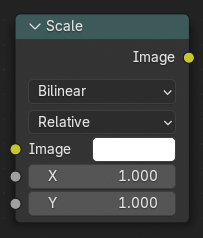
此节点对图像的尺寸进行缩放。
输入
- 图像
标准颜色输入。
- 空间
缩放的相对应坐标空间。
- 相对:
相对于图像输入尺寸的百分比。
- 绝对:
使用绝对像素值作为图像的尺寸大小。
- 场景尺寸:
为场景最终渲染的分辨率大小进行自定义设置。比如,当渲染一个标准的 1080p 分辨率场景,但是设置渲染百分比为 50%,将会把渲染结果的尺寸进行缩放为原大小的一半,其余会用遮罩隐藏不显示。
- 渲染尺寸:
设置渲染面板的图像尺寸。
- 框类型 渲染尺寸
定义图像如何匹配摄像机边框。
- 拉伸:
使图像变形,以适应渲染尺寸。
- 适配:
缩放图像,直到较大的轴 “适配” 渲染尺寸。
- 裁切:
裁切图像,使其与渲染尺寸具有相同的纵横比。
- X、Y
在所选轴向上进行缩放,当 空间 设定为 相对 或 绝对 时可用。
采样
- 插值
Determines how pixel values are interpolated when scaling or transforming images.
- 最近:
Uses the value of the closest pixel with no smoothing. This is the fastest method and is well-suited for pixel art or low-resolution images where sharp, blocky edges are desirable. In animations, motion appears in single-pixel steps, which can cause visible jittering.
- 双线性:
Averages the values of surrounding pixels to create a smoother result than Nearest. Provides a good balance between performance and visual quality.
- 双立方:
Computes a weighted average of a larger neighborhood of pixels for even smoother results. Ideal for photographic images or gradients where preserving fine detail is important.
- 各向异性:
Adjusts interpolation based on the direction and scale of the transformation. Helps reduce blurring or aliasing when scaling at steep angles or uneven resolutions, especially useful in textures viewed at oblique angles or in detailed 3D projections.
- 扩展 X/Y
将扩展模式应用于 X 轴。
- 剪辑:
图像之外的区域用透明填充。
- 扩选:
图像之外的区域由图像中最接近边界的像素填充。
- 重复:
图像之外的区域由图像重复填充。
输出
- 图像
标准颜色输出。
示例
例如当 X: 0.5,Y: 0.5 时将会生成宽高为原尺寸一半的图像。
使用此节点适配图像尺寸。大多数节点产生一个和上部输入连接端口尺寸相同的图像结果。合并两幅不同尺寸的图像,第二幅图像不得不缩放其尺寸以符合第一幅图像的尺寸大小。