Blender 2.92 Manual Logo
  • Почин – Getting Started
  • Інтерфейс Користувача – User Interface
  • Редактори – Editors
    • 3D Оглядвікно – 3D Viewport
    • Редактор Зображень – Image Editor
    • Редактор UV – UV Editor
      • Вступ – Introduction
      • Навігування – Navigating
      • Overlays
      • Sidebar
        • Image Tab
          • UV Vertex
          • Image
          • UDIM Grid
        • Tool Tab
        • View Tab
          • Display
          • 2D Cursor
          • Annotations
        • Scopes
      • Вибирання – Selecting
    • Редактор Шейдерів – Shader Editor
    • Compositor
    • Geometry Node Editor
    • Текстурові Вузли – Texture Nodes
    • Video Sequencer
    • Редактор Відеокліпів – Movie Clip Editor
    • Аркуш Експозицій – Dope Sheet
    • Часолінія – Timeline
    • Редактор Графів – Graph Editor
    • Редактор Драйверів – Drivers Editor
    • Нелінійна Анімація – Nonlinear Animation
    • Редактор Тексту – Text Editor
    • Консоль Python – Python Console
    • Редактор Інфо – Info Editor
    • Outliner
    • Properties
    • Браузер Файлів – File Browser
    • Уподобання – Preferences
  • Сцени та Об’єкти – Scenes & Objects
  • Моделювання – Modeling
  • Ліплення і Малювання – Sculpting & Painting
  • Нарисний Олівець – Grease Pencil
  • Анімація та Оснащування – Animation & Rigging
  • Фізика – Physics
  • Рендеринг – Rendering
  • Компонування – Compositing
  • Motion Tracking & Masking
  • Редагування Відео – Video Editing
  • Файли та Система Даних – Files & Data System
  • Додатки – Add-ons
  • Просунуте – Advanced
  • Усунення несправностей – Troubleshooting
  • Глосарій – Glossary
  • Contribute Documentation
Blender 2.92 Manual
  • »
  • Редактори – Editors »
  • Редактор UV – UV Editor »
  • Sidebar

Sidebar

Image Tab

UV Vertex

Transform Properties Selecting UVs.

Image

See Устави Зображення – Image Settings.

UDIM Grid

Allows you to control the grid size of UDIM tiles.

Tool Tab

Shows the settings for the active tool.

View Tab

Display

You can set the editors display options in this panel.
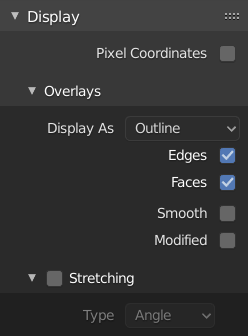
../../_images/editors_uv_display-panel_panel.png

Display panel: With both an image and UVs selected.

Aspect Ratio

Display Aspect for this image. Does not affect rendering.

Repeat Image

Duplicate the image until it is repeated to fill the main view.

Pixel Coordinates

Display UV coordinates in pixels rather than from 0.0 to 1.0

2D Cursor

Location X, Y

Control 2D cursor location.

Annotations

Options for the annotation tool.

Scopes

See Scopes in the Image Editor.

Next Previous

© Авторські права : This page is licensed under a CC-BY-SA 4.0 Int. License Востаннє оновлено 02/25/2021.

  • Edit Page
  • Report Bug
  • 2.92
    • Loading...
  • uk
    • Loading...