Viewer Node
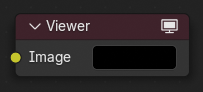
The Viewer node is used to preview image data or value maps anywhere within a compositor node graph. It is a diagnostic tool that allows users to inspect intermediate results without affecting the final output.
You can quickly assign a node to a Viewer by pressing Shift-Ctrl-LMB on the desired node. To switch between multiple Viewer nodes, simply select one with LMB. Only the active Viewer node (with the icon in the header) will be displayed in the backdrop or Image Editor.
Ingressi
- Immagine
Outputs the result of this input directly to the viewer result. If this socket is left unconnected, the output will be a black image.
Uscite
Questo nodo non ha connettori d’uscita.
Uso
Compositor Backdrop
When a Viewer node is active and Backdrop is enabled, its image is displayed behind the node tree as a backdrop. This allows compositing operations to be evaluated directly while editing the node graph.
When the active Viewer node is selected, an interactive gizmo is displayed in the backdrop if Active Node is enabled. The gizmo can be used to:
Move the backdrop image.
Scale the backdrop image.
These adjustments only affect how the image is displayed in the Node Editor and do not modify the image itself or the compositor output.
Keyboard Shortcuts
Viewer nodes provide a quick way to toggle between different viewer nodes while compositing using keyboard shortcuts, improving workflow efficiency when comparing outputs.
Assign Shortcut (Ctrl-1, Ctrl-2, etc.): Select a node and press a shortcut to assign it. If no Viewer node is attached, one is created and activated. The number will be shown in the upper right part of the node to identify which shortcut is assigned.
Activate Node (1, 2, etc.): Press the assigned number key to activate the node’s Viewer output.
Nota
Only number keys (1-9) are supported.
Uso dell” Editor Immagine
Il nodo Visualizzatore consente di visualizzare i risultati nell’Editor Immagine. L’immagine è facilitata nell’intestazione selezionando Nodo Visualizzatore nel menu di blocco dati Immagine collegato. L’Editor Immagine visualizzerà l’immagine dal nodo Visualizzatore attualmente selezionato.
To save the image being viewed, use , Alt-S to save the image to a file.
The Image Editor also has three additional options in its header to view Images with or without Alpha, or to view the Alpha or Z itself. Click and holding the mouse in the Image displayed allows you to sample the values.
Vedi anche
For overlays specific to the Viewer node (such as text info and render guides), see Guides Overlays.