Blender 2.93 Manual Логотип
  • Начало работы
  • Интерфейс пользователя
  • Editors (редакторы)
    • 3D Viewport
    • Редактор изображений
    • UV Editor
      • Введение
      • Навигация
      • Overlays (наложения)
      • Боковая панель
        • Image Tab
          • UV Vertex
          • Image
          • UDIM Grid
        • Tool Tab
        • View Tab
          • Отображение
          • 2D Cursor
          • Заметки
        • Scopes (визуализаторы)
      • Выбор
    • Shader Editor
    • Compositor
    • Geometry Node Editor
    • Текстурные узлы
    • Video Sequencer
    • Movie Clip Editor
    • Dope Sheet
    • Timeline
    • Graph Editor
    • Drivers Editor
    • Nonlinear Animation
    • Text Editor
    • Python Console
    • Info Editor
    • Outliner
    • Свойства
    • File Browser
    • Preferences
    • Spreadsheet
  • Сцены и Объекты
  • Моделирование
  • Скульптинг и Рисование
  • Grease Pencil
  • Анимация и Риггинг
  • Физика
  • Rendering (визуализация)
  • Compositing
  • Захват движения и Маскирование
  • Видео-редактирование
  • Files & Data System
  • Дополнения (Add-ons)
  • Расширения
  • Решение проблем
  • Словарь
  • Contribute Documentation
Blender 2.93 Manual
  • »
  • Editors (редакторы) »
  • UV Editor »
  • Боковая панель

Боковая панель

Image Tab

UV Vertex

Transform Properties Selecting UVs.

Image

See Image Settings (настройки изображения).

UDIM Grid

Allows you to control the grid size of UDIM tiles.

Tool Tab

Отображение параметров активного инструмента.

View Tab

Отображение

You can set the editors display options in this panel.
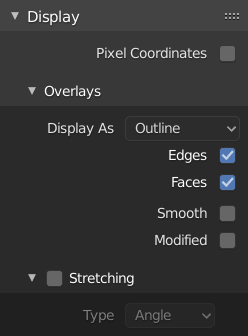
../../_images/editors_uv_sidebar_display-panel.png

Display panel: With both an image and UVs selected.

Aspect Ratio (соотношения сторон)

Display Aspect for this image. Does not affect rendering.

Repeat Image (повтор изображения)

Duplicate the image until it is repeated to fill the main view.

Pixel Coordinates

Display UV coordinates in pixels rather than from 0.0 to 1.0

2D Cursor

Location X, Y

Control 2D cursor location.

Заметки

Options for the annotation tool.

Scopes (визуализаторы)

См. Scopes (визуализаторы) (область видимости) в редакторе изображений.

Следующая Предыдущая

© Copyright : This page is licensed under a CC-BY-SA 4.0 Int. License. Обновлено: 06/19/2023.

  • Edit Page
  • Report Bug
  • 2.93
    • Loading...
  • ru
    • Loading...