Blender 2.93 Manual Логотип
  • Начало работы
  • Интерфейс пользователя
    • Система окон
    • Горячие клавиши
    • Элементы управления интерфейсом
      • Кнопки, различные элементы управления
      • Продвинутые элементы управления
        • Меню блока данных
        • List Views & Presets
        • Выбор цвета
        • Виджет цветовой шкалы
        • Палитра цвета
        • Виджет кривых
        • Поиск
          • Меню Search (поиск)
          • Поиск оператора
        • Ноды (узлы)
    • Инструменты
  • Editors (редакторы)
  • Сцены и Объекты
  • Моделирование
  • Скульптинг и Рисование
  • Grease Pencil
  • Анимация и Риггинг
  • Физика
  • Rendering (визуализация)
  • Compositing
  • Захват движения и Маскирование
  • Видео-редактирование
  • Files & Data System
  • Дополнения (Add-ons)
  • Расширения
  • Решение проблем
  • Словарь
  • Contribute Documentation
Blender 2.93 Manual
  • »
  • Интерфейс пользователя »
  • Поиск

Поиск

Меню Search (поиск)

Справка

Mode

Все режимы

Меню

Edit ‣ Menu Search

Горячая клавиша

F3

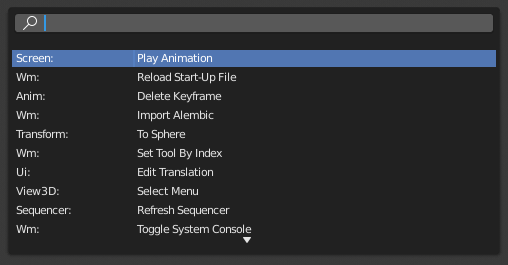
The Menu Search pop-up searches Blender’s interface for a desired tool and allows you to execute that tool. It returns a list of matches and shows which menu the tool was found in. Start typing the name of the tool you want to refine the list. When the list is sufficiently narrowed, LMB on the desired tool or navigate with Down and Up, run the tool by pressing Return.
../../../_images/interface_controls_templates_operator-search_pop-up.png

Всплывающее меню поиска.

См.также

См. параметр Spacebar Action в настройках Blender.

Поиск оператора

Справка

Mode

Все режимы

Меню

Edit ‣ Operator Search

When Developer Extras are activated the Operator Search can be accessed from the Edit menu in the Topbar. This search menu search all operators within Blender even if they are not exposed in a menu. This is useful for Python developers for testing purposes. Blender might also include a few advanced operators that are not exposed in a menu and can only be accessed via this search menu.

Следующая Предыдущая

© Copyright : This page is licensed under a CC-BY-SA 4.0 Int. License. Обновлено: 06/19/2023.

  • Edit Page
  • Report Bug
  • 2.93
    • Loading...
  • ru
    • Loading...