Blender 3.0 Manual Logo
  • Khởi Đầu
  • Giao Diện Người Dùng
    • Hệ thống Cửa Sổ
    • Bố Trí Bàn Phím
    • Điều Khiển Giao Diện
      • Nút Bấm và Điều Khiển
      • Những Điều Khiển mở rộng
        • Trình Đơn khối dữ liệu
        • Bảng liệt kê
        • Ống Hút Chấm Màu
        • Thành Tố Dốc Màu
        • Bảng Pha Màu
        • Thành tố đường cong
        • Tìm Kiếm
          • Tìm Kiếm Trình Đơn
          • Tìm Kiếm thao tác
        • Nút
    • Công Cụ
  • Trình Biên Soạn
  • Cảnh & Vật Thể
  • Tạo Mô Hình
  • Điêu Khắc & Sơn Vẽ
  • Bút Chì Dầu
  • Hoạt Họa & Giàn Dựng
  • Vật Lý
  • Kết xuất
  • Tổng hợp
  • Giám Sát & Chắn Lọc Chuyển Động
  • Phim Video biên soạn
  • Assets, Files, & Data System
  • Trình Bổ Sung
  • Cao Cấp
  • Xử Lý Sự Cố
  • Bảng Thuật Ngữ
  • Đóng Góp Tài Liệu
Blender 3.0 Manual
  • »
  • Giao Diện Người Dùng »
  • Tìm Kiếm

Tìm Kiếm

Tìm Kiếm Trình Đơn

Tham Chiếu

Chế Độ

Tổng Thể

Trình Đơn

Cảnh (Scene) ‣ Bộ Khóa (Keying Set)

Tổ Hợp Phím Tắt

NumpadSlash

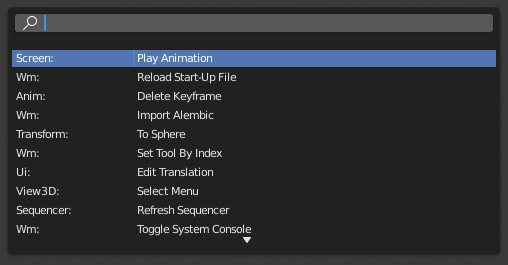
The Menu Search pop-up searches Blender's interface for a desired operator and allows you to execute that operator. It displays a list of matches and shows which menu the operator was found in. Start typing the name of the operator you want to refine the list. When the list is sufficiently narrowed, LMB on the desired operator or navigate with Down and Up, run the selected operator by pressing Return.
../../../_images/interface_controls_templates_operator-search_pop-up.png

Trình đơn tìm kiếm toán tử.

Xem thêm

The Spacebar Action option in the Preferences.

Tìm Kiếm thao tác

Tham Chiếu

Chế Độ

Tổng Thể

Trình Đơn

Cộng Thêm (Add) ‣ Bộ Cốt (Armature)

When Developer Extras are activated the Operator Search can be accessed from the Edit menu in the Topbar. This search menu search all operators within Blender even if they are not exposed in a menu. This is useful for Python developers for testing purposes. Blender might also include a few advanced operators that are not exposed in a menu and can only be accessed via this search menu.

Previous Next

© Copyright : This page is licensed under a CC-BY-SA 4.0 Int. License. Cập nhật mới nhất vào 01/28/2022.

  • Edit Page
  • Report Bug
  • 3.0
    Versions
    • Loading...
  • vi
    Languages
    • Loading...