Nút Đường Đi của Ánh Sáng (Light Path Node)
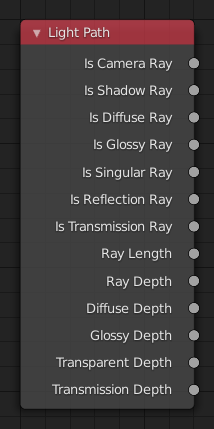
Nút Đường Đi của Ánh Sáng.
The Light Path node is used to find out for which kind of incoming ray the shader is being executed; particularly useful for non-physically-based tricks. More information about the meaning of each type is in the Light Paths documentation.
Đầu Vào (Inputs)
Nút này không có đầu vào.
Tính Chất (Properties)
Nút này không có Tính Chất nào cả.
Đầu Ra (Outputs)
- Tia máy quay phim (Is Camera Ray)
1.0 if shading is executed for a camera ray, otherwise 0.0.
- Là Tia Bóng Tối (Is Shadow Ray)
1.0 if shading is executed for a shadow ray, otherwise 0.0.
- Tia Khuếch Tán (Is Diffuse Ray)
1.0 if shading is executed for a diffuse ray, otherwise 0.0.
- Tia Bóng Bẩy (Is Glossy Ray)
1.0 if shading is executed for a glossy ray, otherwise 0.0.
- Là Tia Lập Dị Duy Cycles (Cycles Only) (Is Singular Ray Cycles Only)
1.0 if shading is executed for a singular ray, otherwise 0.0.
- Là Tia Phản Xạ Duy Cycles (Cycles Only) (Is Reflection Ray Cycles Only)
1.0 if shading is executed for a reflection ray, otherwise 0.0.
- Là Tia Truyền Xạ Duy Cycles (Cycles Only) (Is Transmission Ray Cycles Only)
1.0 if shading is executed for a transmission ray, otherwise 0.0.
- Chiều Dài Của Tia Xạ Duy Cycles) (Ray Length Cycles Only)
Distance traveled by the light ray from the last bounce or camera.
- Độ Sâu của Tia (Ray Depth)
Number of times the ray has been reflected or transmitted on interaction with a surface.
Ghi chú
Passing through a transparent shader does not count as a normal "bounce".
- Độ Sâu Khuếch Tán Duy Cycles (Cycles Only) (Diffuse Depth Cycles Only)
Number of times the ray has gone through diffuse reflection or transmission.
- Độ Sâu của Ánh Bóng Bẩy Duy Cycles (Cycles Only) (Glossy Depth Cycles Only)
Number of times the ray has gone through glossy reflection or transmission.
- Chiều Sâu Của Độ Trong Suốt Duy Cycles (Transparent Depth Cycles Only)
Returns the number of transparent surfaces passed through.
- Độ Sâu Truyền Xạ Duy Cycles) (Transmission Depth Cycles Only)
Replace a Transmission light path after X bounces with another shader, e.g. a Diffuse one. This can be used to avoid black surfaces, due to low amount of max bounces.