Blender 3.3 Manual Logo

Prise en main

  • À propos de Blender
  • Installation de Blender
  • Configuration de Blender
  • Système d’aide

Sections

  • User Interface
  • Éditeurs
    • 3D Viewport
    • Image Editor
    • Éditeur UV
      • Introduction
      • Navigation
      • Overlays
      • Sidebar (Barre Latérale)
        • Onglet Image
          • UV Vertex
          • Image
          • UDIM Tiles
        • Onglet Tool
        • View Tab
          • Affichage
          • 2D Cursor
          • Annotations
        • Scopes
      • Sélection
      • Snapping
    • Compositor
    • Les nœuds Texture
    • Éditeur de nœud de géométrie
    • Éditeur Shader
    • Video Sequencer
    • Éditeur Movie Clip
    • Dope Sheet
    • Timeline
    • Éditeur Graph
    • Drivers Editor (Editeur de Pilotes)
    • Non-linear Animation (Animation Non-linéaire)
    • Éditeur de texte
    • La Console de Python
    • Éditeur Info
    • Outliner
    • Properties
    • File Browser
    • Asset Browser (Navigateur d’assets)
    • Spreadsheet
    • Preferences
  • Scènes et objets
  • Modeling
  • Sculpture et peinture
  • Grease Pencil
  • Animation et rigging
  • Physics
  • Rendering (rendu)
  • Composition
  • Motion Tracking & Masking
  • Montage vidéo
  • Assets, Fichiers et Système de données
  • Add-ons (modules supplémentaires)
  • Avancé
  • Diagnostic des anomalies
  • Glossaire

Impliquez-vous

  • Contribuer à la documentation
Blender 3.3 Manual
  • »
  • Éditeurs »
  • Éditeur UV »
  • Sidebar (Barre Latérale)

Sidebar (Barre Latérale)

Onglet Image

UV Vertex

Transform Properties Selecting UVs.

Image

Voir Paramètres d’image.

UDIM Tiles

Allows you to manage UDIM Tiles.

Onglet Tool

Affiche les paramètres de l’outil actif.

View Tab

Affichage

You can set the editors display options in this panel.
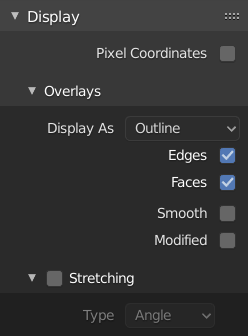
../../_images/editors_uv_sidebar_display-panel.png

Display panel: With both an image and UVs selected.

Aspect Ratio

Display Aspect for this image. Does not affect rendering.

Repeat Image

Duplicate the image until it is repeated to fill the main view.

Pixel Coordinates

Display UV coordinates in pixels rather than from 0.0 to 1.0

2D Cursor

Location X, Y

Control 2D cursor location.

Annotations

Options for the annotation tool.

Scopes

Voir Scopes dans l’Éditeur Image.

Précédent Suivant

© Copyright : This page is licensed under a CC-BY-SA 4.0 Int. License. Mis à jour le 10/02/2024.

  • Edit Page
  • Rapporter un problème dans cette page
  • 3.3
    Versions
    • Loading...
  • fr
    Languages
    • Loading...