Blender 2.93 Manual Logo
  • 入门
  • 用户界面
    • 窗口系统
    • 键位映射
    • 界面控件
      • 按钮与控件
      • 扩展控件
        • 数据块菜单
        • List Views & Presets
        • 拾色器
        • 颜色渐变部件
        • 调色板
        • 曲线部件
        • 查找
        • 节点
          • 简介
          • 节点部件
          • 选择
          • 排列节点
          • 编辑
          • 侧栏
            • 节点
              • 节点
                • 颜色
              • 属性
            • 工具
              • 活动工具
            • 视图
              • 标注
          • 节点组
          • 节点框
          • 转接点
    • 工具
  • 编辑器
  • 场景&物体
  • 建模
  • 雕刻&绘制
  • 蜡笔
  • 动画 & 绑定
  • 物理
  • 渲染
  • 合成
  • 运动跟踪 & 遮罩
  • 视频编辑
  • Files & Data System
  • 插件
  • 高级
  • 问题排查
  • 词汇表
  • 贡献文档
Blender 2.93 Manual
  • »
  • 用户界面 »
  • 节点 »
  • 侧栏

侧栏

节点

参考

面板

侧边栏 ‣ 节点

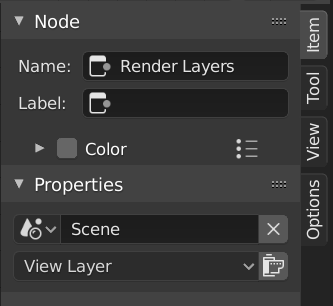
../../../_images/interface_controls_nodes_sidebar_item.png

节点选项卡,选择了一个合成渲染层节点。

节点

名称

该节点树内的唯一节点标识符。

标签

可以通过修改文本字段为节点赋予标题。

颜色

By default, the nodes background color is defined by the user theme. This color can be overridden by selecting a custom color in this panel. Custom node colors can be used to provide a visual cue to help distinguish some nodes from others. In the panel header, colors can be saved as a preset for reuse in other nodes or other projects.

颜色

节点的背景颜色。

指定节点颜色

This menu contains operators for working with nodes with custom colors.

复制颜色

复制 活动 节点的颜色,并将其应用于所有选定的节点。

属性

显示的属性取决于所选节点的类型,例如 混合节点与遮罩节点具有不同的属性。

工具

参考

面板

侧栏区块(Sidebar region) ‣ 工具(Tool)

活动工具

此面板中的信息随所选工具而变化。

视图

参考

面板

侧边栏区域 ‣ 查看

标注

您可以在工具栏中选择标注工具,以在节点编辑器中进行标注。更多信息参见 标注工具。

Next Previous

© Copyright : This page is licensed under a CC-BY-SA 4.0 Int. License. Last updated on 06/19/2023.

  • Edit Page
  • Report Bug
  • 2.93
    • Loading...
  • zh-hans
    • Loading...