Blender 3.0 Manual Logo
  • 入門
  • ユーザーインターフェース
  • Editors(エディター)
    • 3D Viewport(3Dビューポート)
    • Image Editor(画像エディター)
    • UV Editor
      • はじめに
      • ナビゲート
      • Overlays(オーバーレイ)
      • サイドバー
        • Image タブ
          • UV Vertex
          • Image(画像)
          • UDIM Grid
        • Tool タブ
        • View タブ
          • Display(表示)
          • 2D Cursor
          • Annotations(アノテーション)
          • Custom Grid
        • Scopes
      • 選択
      • Snap(スナップ)
    • Shader Editor
    • Compositor
    • Geometry Node Editor
    • Texture Nodes(テクスチャノード)
    • Video Sequencer(ビデオシーケンサー)
    • Movie Clip Editor
    • Dope Sheet
    • Timeline(タイムライン)
    • Graph Editor
    • Drivers Editor
    • Nonlinear Animation
    • Text Editor
    • Python Console
    • Info Editor
    • アウトライナー
    • Properties(プロパティ)
    • File Browser(ファイルブラウザー)
    • Asset Browser
    • Preferences(プリファレンス)
    • Spreadsheet
  • シーン & オブジェクト
  • Modeling(モデリング)
  • Sculpting & Painting
  • Grease Pencil(グリースペンシル)
  • アニメ―ション&リギング
  • Physics
  • Rendering(レンダリング)
  • Compositing
  • Motion Tracking & Masking
  • Video Editing
  • Assets, Files, & Data System
  • Add-ons(アドオン)
  • 高度な設定
  • Troubleshooting
  • Glossary
  • Contribute Documentation
Blender 3.0 Manual
  • »
  • Editors(エディター) »
  • UV Editor »
  • サイドバー

サイドバー

Image タブ

UV Vertex

選択している UV の、Transform のプロパティです。

Image(画像)

イメージの設定 を参照してください。

UDIM Grid

UDIM タイルのグリッド サイズを制御できます。

Tool タブ

アクティブなツールの設定を表示します。

View タブ

Display(表示)

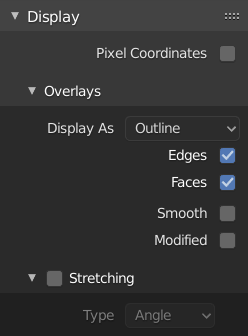
このパネルでは、エディタの表示オプションを設定できます。

../../_images/editors_uv_sidebar_display-panel.png

Display パネル: 画像と UV の両方が選択されています。

Aspect Ratio

この画像のアスペクトを表示します。レンダリングには影響しません。

Repeat Image

メインビューを埋めるために画像が繰り返されるまで、画像を複製します。

Pixel Coordinates

UV 座標を 0.0 から 1.0 ではなく、ピクセルで表示します。

2D Cursor

Location X, Y

2D カーソルの位置を制御します。

Annotations(アノテーション)

annotation tool のオプション。

Custom Grid

Displays a grid that does not depend on the zoom level to determine the number of subdivisions. The Custom Grid is useful in combination with Absolute Grid Snap to create precise incremental snapping.

Subdivisions(細分化)

The number of grid units in UV that make one UV unit.

Scopes

Image Editor の Scopes を参照してください。

Previous Next

© Copyright : This page is licensed under a CC-BY-SA 4.0 Int. License. 最終更新: 01/28/2022

  • Edit Page
  • Report Bug
  • 3.0
    Versions
    • Loading...
  • ja
    Languages
    • Loading...