Властивості – Properties
Орієнтир – Reference
| Mode: | Object and Edit Mode |
|---|---|
| Panel: |
All Meta objects of a same family in a scene interact with each other. The settings in the Metaball section apply to all meta objects of the active family. In Edit Mode, the Active Element panel appears for editing individual meta elements.
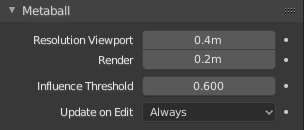
Family meta properties. |
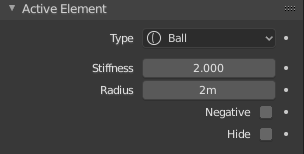
Individual meta properties. |
Роздільність – Resolution
The Resolution controls the resolution of the resultant mesh as generated by the Meta objects.
- Viewport
- The 3D Viewport resolution of the generated mesh; finest to coarsest.
- Зображ, Рендер – Render
- The rendered resolution of the generated mesh; finest to coarsest.
One way to see the underlying mathematical structure is to lower the Resolution, increase the Threshold and set the Stiffness (see below) a fraction above the Threshold. Fig. Підлежача структура. is a meta cube with the above mentioned configuration applied as follows: Resolution of 0.410, Threshold of 5.0 and Stiffness a fraction above at 5.01.
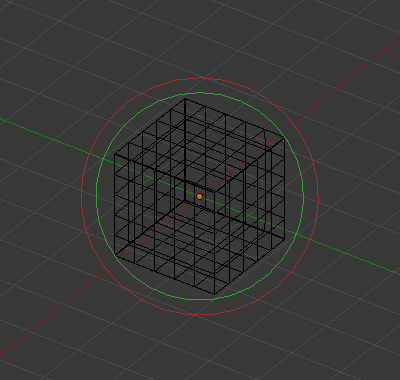
Підлежача структура. |
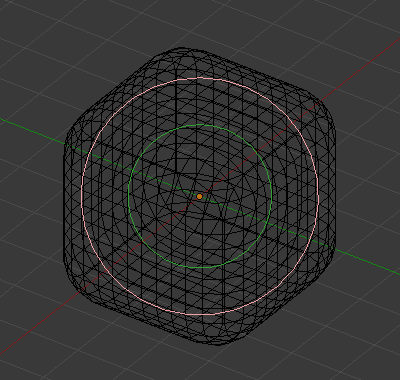
Форма мета куба. |
Ви можете ясно бачити підлежачу кубічну структуру, що дає форму мета куба.
Influence Threshold
Influence Threshold defines how much a meta’s surface «influences» other metas. It controls the field level at which the surface is computed. The setting is global to a group of Meta objects. As the threshold increases, so does the influence that each meta has on each other.
There are two types of influence: positive or negative.
Оновлення – Update
While transforming metas (move, scale, etc.), you have four «modes» of visualization, located in the Update buttons group of the Metaball panel:
- Завжди – Always
- fully display the meta during transformations.
- Половина – Half
- During transformations, display the meta at half its Wiresize resolution.
- Швидко – Fast
- Do not display meta during transformations.
- Ніколи
- Ніколи не показує сіть мета (не дуже рекомендована опція, оскільки мета буде видимий тільки під час рендерингу!).
Це повинно допомогти вам, якщо ви зіткнулися з труднощами (мета є досить обчислювано затратними…), але із сучасними комп’ютерами, це не повинно траплятися, допоки ви не використовуєте багато мета або з дуже високими їх роздільностями…