Animação#
The Animation section lets you manage settings related to Animation. This includes how editors look and also some different tools properties.
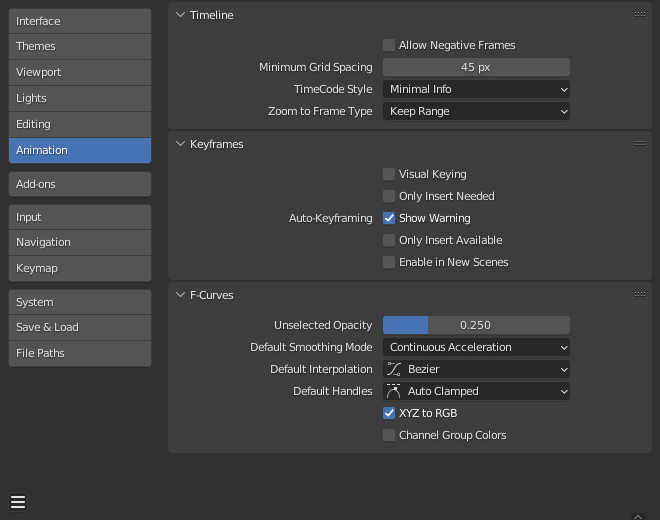
Secção de Animação Preferências Blender.#
Linha do tempo#
These settings control things in the Timeline.
- Permitir quadros negativos
Playback and animations can occur during negative frame ranges.
- Espaçamento mínimo da grade
O numero mínimo de pixels entre as linhas da grelha.
- Timecode Style
Format of timecodes displayed when not displaying timing in terms of frames.
- Minimal Info:
Most compact representation, uses “+” as separator for sub-second frame numbers, with left and right truncation of the timecode as necessary.
- SMPTE (Full):
Full SMPTE timecode (format is HH:MM:SS:FF).
- SMPTE (Compact):
SMPTE timecode showing minutes, seconds, and frames only – hours are also shown if necessary, but not by default.
- Compact with Decimals:
Similar to SMPTE (Compact), except that the decimal part of the second is shown instead of frames.
- Only Seconds:
Direct conversion of frame numbers to seconds.
- Zoom to Frame Type
Defines what time range (around the cursor) will be displayed when the View Frame Numpad0 is performed.
- Manter amplitude:
The currently displayed time range is preserved.
- Segundos:
The number of seconds specified in the Zoom Seconds field will be shown around the cursor.
- Quadros-chave:
The number of animation keyframes defined in the Zoom Keyframes field will be shown around the cursor.
Quadros-chave#
These settings control Keyframes which are the building blocks for animations.
- Default Key Channels
Which channels to insert keys at when no keying set is active.
- Localização:
Inset keyframes for an object’s Location.
- Rotação:
Inset keyframes for an object’s Rotation.
- Escala:
Inset keyframes for an object’s Scale.
- Modo de rotação:
Inset keyframes for an object’s Rotation Mode.
- Propriedades personalizadas:
Inset keyframes for Propriedades personalizadas.
- Inserir somente o necessário
Isto fará com que a inserção de quadros-chave ocorra somente se o valor da propriedade for diferente.
- Manual:
When keying manually, skip inserting keys that don’t affect the animation.
- Automático:
Auto-Keying will skip inserting keys that don’t affect the animation.
- Keyframing – Visual Keying
Quando um objeto está utilizando as Restrições, os valores das propriedades dos objetos não são alteradas. A opção de Inserção de chaves visuais irá adicionar quadros-chave às propriedades do objeto, com um valor embasado nas transformações visuais da restrição.
- Auto-Keyframing
- Activado em Cenas Novas
Habilita a Inserção automática de quadros-chave por padrão nas cenas recém criadas.
- Mostrar Aviso
Displays a warning at the top right of the 3D Viewport, when moving objects, if Auto Keyframe is on.
- Inserir somente nas curvas disponíveis
This will only add keyframes to channels of F-Curves that already exist.
Veja também
Aprender mais sobre Auto-Keyframing.
F-Curves#
Estas definições controlam a aparência e comportamento de F-Curves.
- Opacidade Desseleccionado
Controla a opacidade de :doc:`F-Curves </editors/graph_editor/fcurves/index>`desseleccionado sobre o fundo do Editor de Gráficos.
- Modo Padrão de Suavização
Controls the behavior of automatic curve handles for newly created F-Curves.
- Interpolação Padrão
Controla a Interpolação padrão para os quadros-chave recém criados.
- Manípulos Padrão
Controls the default Handle for newly created F-Curves.
- XYZ to RGB
Cor para X, Y ou Z curvas de animação (localização, escala ou rotação) sendo a mesma cor para os eixos X, Y e Z.
- Channel Group Colors
Desenha os grupos e canais com cores que combinem com os seus grupos correspondentes.
- Only Show Selected F-Curve Keyframes
Only shows the keyframes markers on the selected curves.
- Use High Quality Display
Display F-Curves using Anti-Aliasing and other effects (disable for a better performance).