Nodo Combinar paquete
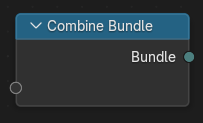
The Combine Bundle node creates a new Bundle from multiple input values. Each input becomes an element of the bundle, identified by its socket name. Values can be accessed in other parts of the node tree using the Separate Bundle
Entradas
The node can contain an arbitrary number of input sockets. Each socket can be given a custom name and type. Supported types include (but not limited to):
Geometría
Objetos
Valores (p.ej: decimal, entero, booleano, vector, color)
Campos
Paquetes anidados
Propiedades
Las propiedades están disponibles en la pestaña Nodo de la Barra lateral.
- Sincronizar conectores
Updates the current node to match the socket signature of the connected nodes. Use this after renaming, adding, or removing sockets.
- Definir firma
Locks the current item list and types to stabilize interfaces when publishing node groups. When enabled, adding/removing items is disabled until the option is turned off.
Elementos del paquete
- Lista de elementos del paquete
Mostrará una entrada por cada elemento del paquete. Hacer doble clic para renombrar.
- Agregar elemento
Agregará un nuevo conector al paquete.
- Eliminar elemento
Eliminará el conector seleccionado.
- Tipo
The data type for the selected item (e.g. Float, Vector, Geometry, Object, Bundle). For value types, a default value control is shown and used when the socket is unlinked.
Salidas
- Paquete
El paquete resultante, conteniendo todas las entradas definidas.