Attribute Proximity
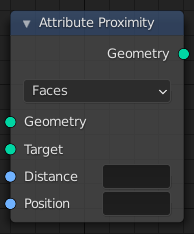
The Attribute Proximity node.
For each point in the input geometry, this node finds the closest position on the target. Both the positions and the distances to them can be stored in attributes.
Vstupy
- Geometria
Štandardný vstup geometrie.
- Cieľ
Štandardný vstup geometrie.
- Vzdialenosť
The name of the float attribute where the computed distance is stored. A new attribute with that name is added if it does not exist yet. If it does exist, the values of the existing attribute are overridden.
- Pozícia
The name of the attribute where the computed location is stored. A new attribute with that name is added if it does not exist yet. If it does exist, the values of the existing attribute are overridden.
Vlastnosti
- Geometria cieľa
- Plôšky
Calculate the closest point anywhere on the faces of the target geometry’s mesh.
- Hrany
Calculate the closest point anywhere on the edges of the target geometry’s mesh.
- Body
Calculate the closest point or vertex on the target geometry. This mode is usually the fastest.
Výstup
- Geometria
Štandardný výstup geometrie.
Príklady
The different modes of the node: faces, edges and points. In this example the geometry nodes modifier is added on the plane. Note that the plane is subdivided and the cube is not.

Target Geometry mode: faces.

Target Geometry mode: edges.

Target Geometry mode: points.
Be sure to set the mode to points when the target is a point cloud.

Attribute Proximity node with a point cloud as target.