Selecting – Вибирання#
Посилання
- Режим:
Режим Редагування
- Меню:
- Скорочення:
1, 2, 3
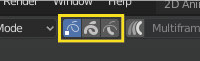
Кнопки вибору Режиму Редагування.#
In Edit Mode there are three different selection modes. You can enter the different modes by selecting one of the three buttons in the header.
- Points – Точки
Для вибору окремих точок.
- Штрихи – Strokes
Для вибору всього штриха.
- Points in Between
Для вибору усіх точок, що є між іншими штрихами.
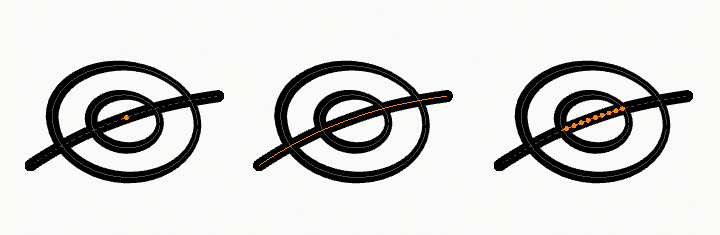
Приклад вибрання точок, штриха та точок поміж.#
Вибрати Випадково – Select Random#
Посилання
- Режим:
Режим Редагування
- Меню:
«Вибір > Вибрати Випадково» –
Randomly selects unselected points or strokes.
- Ratio – Пропорція
The likelihood of an unselected elements being selected. Note that, this is not the percentage amount of elements that will be selected.
- Random Seed – Базис Випадковості
Seed, використовуваний генератором псевдо-випадкових чисел.
- Action – Дія
Selection or deselection of elements.
- Unselect Ends
Excludes the selection of stroke end points.
Вибрати Поперемінно – Select Alternated#
Посилання
- Режим:
Режим Редагування
- Меню:
Вибирає поперемінно точки у вибраних штрихах.
Select More/Less – Вибір Більше/Менше#
Посилання
- Режим:
Режим Редагування
- Меню:
– «Вибір > Більше/Менше»
- Скорочення:
Ctrl-NumpadPlus, Ctrl-NumpadMinus
The purpose of these tools is to reduce or enlarge the current selection within a stroke (i.e. they will never «go outside» of a stroke or «jump» to another stroke in the same object).
- Більше – More
Для кожної вибраної точки вибираються усі пов’язані з нею точки (тобто, одна чи дві…).
- Менше – Less
For each selected point, if all points linked to this point are selected, keep this one selected. Otherwise, deselect it.
Підказка
When all points of a stroke are selected, nothing will happen (as for Less, all linked points are always selected, and of course, More cannot add any). Conversely, the same goes when no points are selected.
Вибрати Груповане – Select Grouped#
Посилання
- Режим:
Режим Редагування
- Меню:
«Вибір > Вибрати Груповане» –
- Скорочення:
Shift-G
- Layer – Шар
Selects all the points/strokes on the same layer.
- Матеріал
Selects all the points/strokes that share the same material.
Select Linked – Вибір Пов’язане#
Посилання
- Режим:
Режим Редагування
- Меню:
«Вибір > Вибрати Пов’язане» –
- Скорочення:
L, Ctrl-L
L (або Ctrl-L для усіх) додасть у вибрання керувальну точку, найближчу від курсора, та всі пов’язані, тобто, усі точки, що належать одному і тому ж штриху.
Вибрати Перше/Останнє – Select First/Last#
Посилання
- Режим:
Режим Редагування
- Меню:
«Вибір > Перше/Останнє» –
These operators will toggle the selection of the first or last point(s) of the stroke(s) in the object. This is useful to quickly find the start of a stroke.
Select Color Attribute#
Посилання
- Режим:
Режим Малювання Вершин – Vertex Paint Mode
Selects all points with a similar Color Attribute as the current selection.
- Tolerance – Допуск
How similar colors are allowed to be; higher values select a wider range of colors.