Модифікатор «Решітка» – Lattice Modifier
The Lattice modifier deforms the base object according to the shape of a Lattice object. Objects to be deformed can be meshes, curves, surfaces, text, lattices and even particles.
Порада
A Lattice modifier can quickly be added to selected objects by parenting them using the Lattice Deform option.
Опції
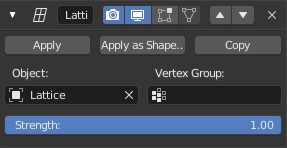
The Lattice modifier.
- Об’єкт – Object
- The Lattice object with which to deform the base object.
- Група Вершин – Vertex Group
- Факультативно ім’я групи вершин, яке дозволяє вам лімітувати ефект цього модифікатора частиною базової сіті.
- Сила – Strength
- Фактор для керування змішуванням між оригінальною та деформованою позиціями вершини.
Поради
Why would you use a lattice to deform a mesh instead of deforming the mesh itself in Edit Mode? There are a couple of reasons for that:
- If your object has a large number of vertices, it would be difficult to edit portions of it quickly in Edit Mode. Using a lattice will allow you to deform large portions efficiently.
- The smooth deformation you get from a Lattice modifier can be hard to achieve manually.
- Одночасно кілька об’єктів можуть використовувати одну і ту ж решітку, що дозволяє вам редагувати водночас кілька об’єктів за раз.
- Like all modifiers, it is non-destructive. Meaning all changes happen on top of the original geometry, which you can still go back to and edit without affecting the deformation.
- Решітка не впливає на координати текстури поверхні сіті.
Примітка
When using a lattice to deform particles, order in the modifier stack matters. You need to place the Lattice modifier after the Particle System one.