File Paths
The File section in Preferences allows you to configure auto-save preferences and set default file paths for blend-files, rendered images, and more.
Locations for various external files can be set for the following options:
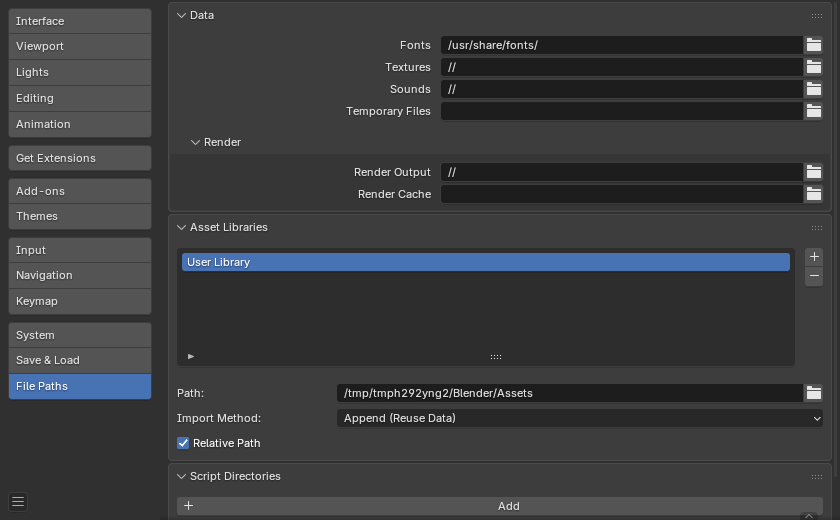
Preferences File Paths section.
Petunjuk
The default path // refers to the folder of the currently open blend-file
(see Relative Paths for details).
Data
- Fonts
Default location to browse for text object font files.
- Textures
Default location to browse for image textures.
- Sounds
Default location to browse for sound files.
- Temporary Files
The directory for storing temporary save files. The path must reference an existing directory or it will be ignored and the systems temporary directory will be used instead. When left blank, the systems temporary directory will be used (see Temporary Directory for details).
Render
- Render Output
Where rendered images/videos are saved.
- Render Cache
The location where cached render images are stored.
- Texture Cache
Directory to store
.txtexture cache files, relative to the source image file or as an absolute path. Used by the Cycles Texture Cache.
Script Directories
Additional locations to search for Python scripts.
Each path can be given a Name to signify to purpose of that script directory.
By default, Blender looks in several directories (platform dependent) for scripts. By adding a user script path in the preferences an additional directory is used. This can be used to store your own scripts and add-ons independently of the current Blender version.
You will need to create specific subfolders in this path which match the structure of the scripts
folder found in Blender's installation directory.
The following subdirectories will be used when present:
startup/Modules in this folder will be imported on startup.
addons/Legacy add-ons located here will be listed in the add-ons preferences.
modules/Modules in this folder can be imported by other scripts.
presets/Presets in this folder will be added to existing presets.
Petunjuk
For add-ons it is now recommended to use a local extension repository if you wish to define additional locations to install and manage them.
To make use of these you will need to define them as extensions.
Catatan
You have to restart Blender for all changes to the users scripts to take effect.
Applications
- Image Editor
The path to an external program to use for image editing.
- Animation Player
The program used for playing back rendered animations via View Animation.
By default this is set to Internal which uses Blender's built-in animation player.
This has the advantage that all image formats supported by Blender can be played back and no 3rd party application needs to be installed.
Text Editor
- Program
Command to launch the text editor when using Edit Externally, either a full path or a command in
$PATH. Use the internal editor when left blank.
- Arguments
Defines the specific format of the arguments with which the text editor opens files.
The supported expansions are as follows:
$filepath: The absolute path of the file.$line: The line to open at (Optional).$column: The column to open from the beginning of the line (Optional).$line0&$column0similar to the above but they start at zero.
Example:
-f $filepath -l $line -c $column
Development
Only visible when Developer Extras are enabled.
- I18n Branches
The path to the
/branchesdirectory of your local SVN translation copy, to allow translating from the UI.
Known Limitations
Permissions on Windows
Be sure that you have the right privileges for running the executable accessing the path defined. On Windows for instance, if the option "Run this program as an administrator" is enabled for the executable, it will lead to a failure to open the editor due to a limitation within the OS User Account Control. Running a program with elevated privileges is potentially dangerous!