Raycast Node
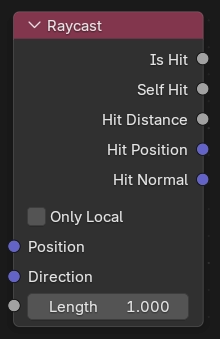
The Raycast node traces a ray in the Scene and reports information from the first surface it hits (if any).
This is an expensive node and can significantly slow down renders. You can bake the results to improve render times.
Cycles Only The Raycast node interprets all scene geometry as opaque. It doesn’t take transparency into account to discard hits.
EEVEE Only The Raycast node has the usual Screen-Space Effects limitations.
Tipp
Objects can be excluded from ray cast intersections by disabling Raycast in the object’s visibility settings.
This can be useful to prevent helper geometry or other objects from being detected by the Raycast node.
Inputs
- Position
The starting position of the ray. When not connected, the surface position is used.
- Direction
The direction the ray goes towards. When not connected, the surface normal is used.
- Länge
The maximum distance the ray can travel before being considered „no hit“.
Eigenschaften
- Only Local
Only report hits against the object itself, not other objects.
Outputs
- Is Hit
One if a hit was detected, zero otherwise.
- Self Hit
One if the detected hit was against the object itself, zero otherwise.
- Hit Distance
The distance the ray has traveled before the hit. If no hit is found, the ray Length is returned.
- Hit Position
The hit location. If no hit is found, a zero vector is returned.
- Hit Normal
The geometry Normal of the hit surface. If no hit is found, a zero vector is returned.
Attributes
Cycles Only
Geometry attributes at the intersection point can be accessed. Add attributes in the Sample Attributes panel in the node editor sidebar, and new attribute sockets appear on the node. Fill in the attribute name and link the new output socket to use the value. When no intersection is found, the attribute output is zero.
EEVEE does not support attribute access, and outputs attributes as zero.