Meta Strips
A Meta Strip is a container strip that groups multiple strips and treats them as a single strip. This helps reduce visual clutter in the Sequencer and makes complex edits easier to manage. Once created, a Meta strip behaves like any other strip and can be moved, trimmed, muted, or have effects applied to it.
Meta strips are primarily an organizational tool. For example, if your edit uses many overlapping strips or complex layer arrangements, you can group related strips into a Meta strip to simplify the timeline.
- Make Meta Strip Ctrl-G
Select all strips you want to group, then press Ctrl-G. The resulting Meta strip spans from the start of the earliest strip to the end of the latest strip, collapsing all contained channels into a single strip.
- UnMeta Strip Ctrl-Alt-G
Ungroup a Meta strip and restore the contained strips to their original relative positions and channels. This is useful if you want to remove the Meta strip while keeping its contents.
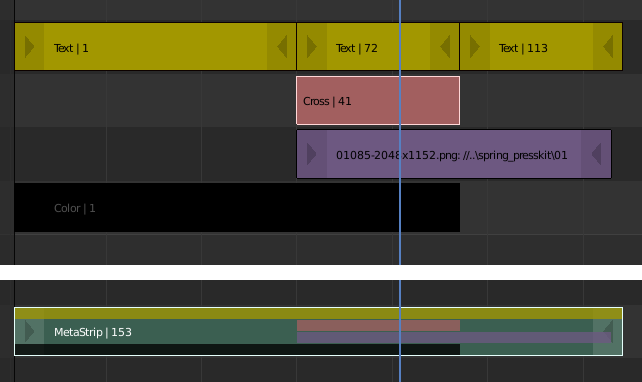
Example of Meta strips.
Editing Meta Strips
To edit the contents of a Meta strip, select it and press Tab. The Sequencer view switches to show only the contents of the Meta strip, hiding all other strips.
Press Tab again to exit and return to the parent timeline.
Meta strips can be nested inside other Meta strips. When working with nested Meta strips, pressing Tab exits only one level at a time. To exit to a higher level, ensure no Meta strip is selected before pressing Tab.
Bemerkung
The default blend mode for a Meta strip is Replace. Depending on the contents, this may change the visual result compared to the original strips. If the output looks incorrect, adjust the blend mode of the Meta strip as needed.
Use Cases
A common use for Meta strips is applying the same effect to multiple strips. For example, if a shot is split across several video files, you can group them into a Meta strip and apply effect strips to the Meta strip instead of duplicating the effects for each individual strip.
Meta strips are also useful for organizing sections of an edit, such as grouping an intro, montage, or lower-third graphics into a single strip.
Siehe auch
Similar workflows can be achieved using an Adjustment Layer effect strip, which applies effects to all strips below it without grouping them.
Eigenschaften
Meta strips share the same properties as other strip types. Property changes act as a group master, affecting all strips contained within the Meta strip.