Meny Switch Node
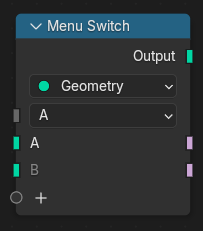
The Menu Switch node outputs one of its inputs based on a selected menu item. Only the active input is evaluated, allowing efficient switching between multiple options.
On top of not evaluating any inactive inputs, which is something all switch nodes do, the Menu Switch has the extra functionality that it hides any socket that is connected to an inactive input, even if they are indirectly coupled through an Index Switch or Switch node. This can be used to hide irrelevant settings from the node interface or modifier panel.
Vilka menyposter som är tillgängliga definieras av användaren. Menyobjekt kan läggas till och tas bort, samt döpas om och ordnas på nytt i sidofältet i redigeraren. Om du byter namn på en menypost behålls befintliga länkar till den matchande ingångssockeln.
Menyn kan användas i nodgrupper och i modifieringsgränssnittet för noder. Genom att ansluta menyingången till en Group Input-nod exponeras menyn som en gruppingång. Ett menyuttag i en nodgrupp, omdirigeringsnod eller andra genomgångsnoder måste anslutas till en Menu Switch-nod för att fungera. Ett menyuttag som inte är anslutet kommer att visa en tom meny som standard.
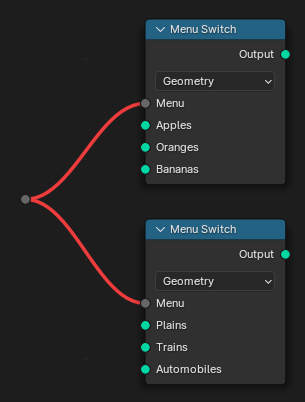
Om flera Menu Switch-noder ansluts till samma utgångssockel uppstår en konflikt (även om menyalternativen är desamma). För att undvika detta kan en menyomkopplare paketeras i en nodgrupp. Flera nodgrupper av samma typ kan anslutas till samma meny, eftersom de innehåller samma menyomkopplingsnod.

Se även
Index Switch Node är liknande men den exponerar valen som ett heltalsindex.
Inmatningar
- Meny
Determines which input socket is passed through to the output.
One input is created for each menu entry. The input corresponding to the selected menu item is evaluated and passed through.
Menu item labels can be renamed using Ctrl-LMB on the socket name or in the node’s Properties panel.
Additional input sockets can be added by: - Dragging a connection onto the empty socket at the bottom of the list. - Clicking the icon in the node header.
Unused inputs are not computed, improving performance in complex node networks.
Egenskaper
- Typ
Bestämmer vilken typ av data som ska hanteras av noden.
Utgångar
- Utdata
Outputs the value from the input corresponding to the selected menu item, unchanged.
For each menu entry, an additional Boolean output is created. The output corresponding to the selected item is true, and all others are false. These Boolean outputs can be used to trigger different node branches, control visibility, or drive conditional operations elsewhere in the node tree.