Varning Node
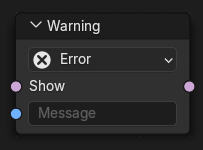
The Warning node outputs a custom message that is displayed when the node tree is evaluated.
This allows node groups to communicate expectations, assumptions, or error conditions, such as required input ranges, missing data, or unsupported configurations.
By default, warnings are propagated through parent node groups. This behavior can be controlled with the Propagation Geometry Nodes setting on each node.
Inmatningar
- Visa
Controls whether the warning is displayed.
When disabled, the warning is suppressed.
- Message
Text of the warning message.
This can be used to describe invalid inputs, required conditions, or other information relevant to users of the node group.
Egenskaper
- Typ av varning
Severity of the warning.
The warning type also determines the icon used when the message is displayed.
- Info:
Informational message that does not indicate a problem.
- Warning:
Indicates a potential issue that may produce unexpected results.
- Fel:
Indicates an invalid configuration that is likely to produce incorrect results.
Utgångar
- Visa
Passes through the Show input.
This can be used to combine or forward warning conditions to other nodes.
Användning
When used inside a Geometry Nodes tree, warnings are displayed in the Varningar panel of the Geometry Nodes modifier.