Introducción#
Referencia
- Panel:
Grease Pencil tiene su propio conjunto de modificadores. Los modificadores son operaciones automáticas que afectarán a un objeto de una manera no destructiva. Mediante el uso de modificadores, será posible realizar varios efectos que de otro modo serían demasiado tediosos de lograr y todo esto sin afectar permanentemente a la geometría base del objeto.
They work by changing how an object is displayed and rendered, but not the geometry which you can edit directly. You can add several modifiers to a single object forming the modifier stack and Apply a modifier if you wish to make its changes permanent.
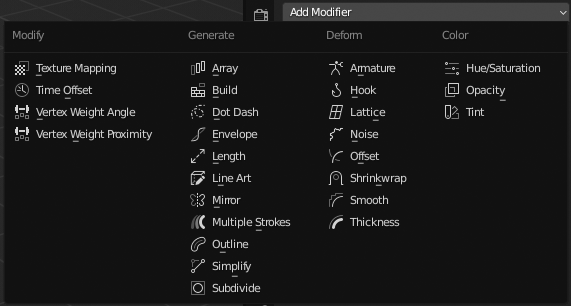
Grease Pencil Modifiers menu.#
There are three types of modifiers for Grease Pencil:
- Modify
These are tools similar to the Deform ones (see below), however, they usually do not directly affect the geometry of the object, but some other data, such as vertex groups.
- Generar
The Generate group of modifiers includes constructive tools that either change the general appearance of or automatically add new geometry to an object.
- Deformar
The Deform group of modifiers only changes the shape of an object without adding new geometry,
- Color
The Color group of modifiers change the object color output.
Interfaz#
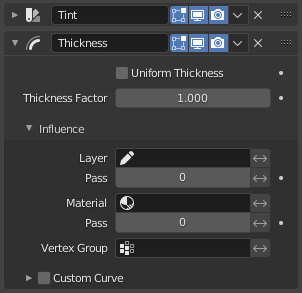
Panel layout (Thickness modifier as an example).#
Each modifier’s interface shares the same basic components like modifiers for meshes.
Ver Interfaz de los modificadores para más información.
Nota
Grease Pencil strokes, unlike meshes, still can not be edited directly in the place.
Filtros de influencia#
La mayoría de los modificadores compartirán algunas propiedades especiales que permiten restringir su efecto únicamente a ciertas partes de los elementos.
- Capa
Restringirá el efecto a una única capa o a cualquier capa con el mismo Identificador en pasada.
- Material
Restringirá el efecto a un único material o a cualquier material con el mismo Identificador en pasada.
- Grupo de vértices
Restringirá el efecto a un único grupo de vértices.
- Curva personalizada
Cuando esta opción se encuentre activa, permitirá usar una curva personalizada para dar forma al efecto a lo largo de los trazos, desde su punto inicial hasta el final.
El interruptor Invertir <-> permitirá invertir el comportamiento del filtro.