Modificador Booleana#
The Boolean modifier performs operations on meshes that are otherwise too complex to achieve with as few steps by editing meshes manually. It uses one of the three available Boolean operations to create a single mesh out of two mesh objects:
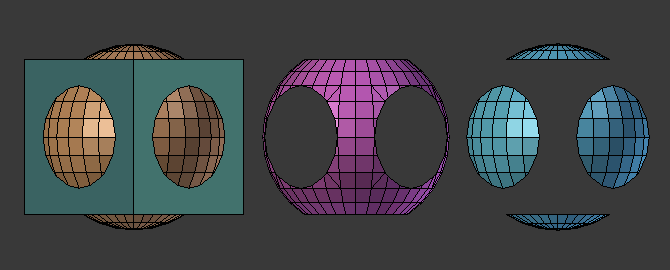
The Union, Intersection and Difference between a Cube and a UV Sphere, with the modifier applied to the sphere and using the cube as target.#
This modifier needs a second mesh object, or collection of mesh objects, to be the target (the second operand) of the operation.
Advertencia
Only Manifold meshes are guaranteed to give proper results, other cases (especially «opened» meshes, Non-manifold but without any self-intersections) will usually work well, but might give odd glitches and artifacts in some cases.
Truco
If you have marked your objects to show the edges (in , enable Wireframe), you will see the edge creation process while you are moving your objects around. Depending on your mesh topology, you can also enable X-Ray and Transparency and see the topology being created in real-time.
Opciones#
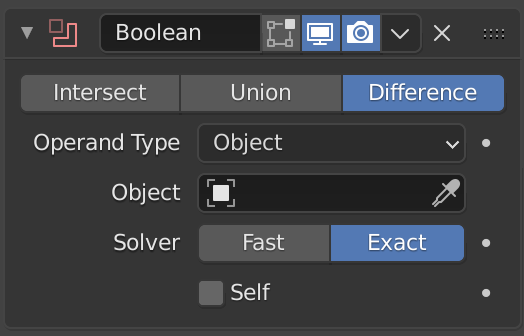
El modificador Booleana.#
- Operación
- Intersección:
Everything inside both the target mesh and the modified mesh is kept. If the target is a collection, then only the inside of all meshes is kept.
- Unión:
The target mesh or collection is added to the modified mesh, removing any interior faces.
- Diferencia:
The target mesh, or collection of meshes, is subtracted from the modified mesh (everything outside of the target mesh or collection is kept).
- Tipo de operando
Choose the type of the operand (target).
- Objeto:
The target is a mesh object.
- Colección:
The target is a collection. When the target is a collection and the Solver is Fast, the Intersect operation is not allowed.
- Objeto
The name of the target mesh object.
- Colección
The name of the target collection (may be empty if Solver is Exact, which can be useful in combination with the Self option).
- Método de resolución
Algoritmo utilizado para calcular las intersecciones booleanas.
- Rápido:
Utilizará un método de resolución matemáticamente simple que ofrecerá el mejor rendimiento; sin embargo, este método carecerá de compatibilidad con superposición de geometrías.
- Exacto:
Utilizará un método de resolución matemáticamente complejo que ofrecerá los mejores resultados y contará con soporte completo para la superposición de geometrías; sin embargo, este método será mucho más lento que el método Decimal.
Opciones de cálculo#
- Materiales método Exacto
Method for setting materials on the new faces.
- Basado en identificador:
Set the material on new faces based on the order of the material slot lists. If a material doesn’t exist on the modifier object, the face will use the same material slot or the first if the object doesn’t have enough slots.
- Transferir:
Transfer materials from non-empty slots to the result mesh, adding new materials as necessary. For empty slots, fall back to using the same material index as the operand mesh.
- Intersección propia método Exacto
Calcula correctamente los casos cuando uno o ambos operandos tienen auto-intersecciones, esto implica más cálculos haciéndolo más lento.
- Tolerancia a huecos método Exacto
Optimizes the Boolean output for Non-manifold geometry at the cost of increased computational time. Because of the performance impact, this option should only be enabled when the Exact solver demonstrates errors with non-manifold geometry.
- Umbral de superposición método Rápido
Maximum distance between two faces to consider them as overlapping. This helps solve the limitation of this solver, if the Boolean result seems unexpected try using the exact solver.