Open Shading Language#
sólo en Cycles
It is also possible to create your own nodes using Open Shading Language (OSL). These nodes will only work with the CPU and OptiX rendering backend.
To enable it, select Open Shading Language as the shading system in the render settings.
Nota
Some OSL features are not available when using the OptiX backend. Examples include:
Memory usage reductions offered by features like on-demand texture loading and mip-mapping are not available.
Texture lookups require OSL to be able to determine a constant image file path for each texture call.
Some noise functions are not available. Examples include Cell, Simplex, and Gabor.
La función trace no funciona (valga el juego de palabras). Como resultado de esto, los nodos Oclusión ambiental y Biselar tampoco podrán funcionar.
Nodo Script#
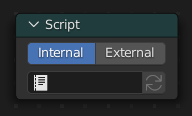
OSL was designed for node-based shading, and each OSL shader corresponds to one node in a node setup. To add an OSL shader, add a script node and link it to a text data-block or an external file. Input and output sockets will be created from the shader parameters on clicking the update button in the Node or the Text editor.
OSL shaders can be linked to the node in a few different ways. With the Internal mode, a text data-block is used to store the OSL shader, and the OSO bytecode is stored in the node itself. This is useful for distributing a blend-file with everything packed into it.
The External mode can be used to specify a .osl file from a drive,
and this will then be automatically compiled into a .oso file in the same directory.
It is also possible to specify a path to a .oso file, which will then be used directly,
with compilation done manually by the user. The third option is to specify just the module name,
which will be looked up in the shader search path.
The shader search path is located in the same place as the scripts or configuration path, under:
- Linux
$HOME/.config/blender/4.2/shaders/
- Windows
C:\Users\$user\AppData\Roaming\Blender Foundation\Blender\4.2\shaders\
- macOS
/Users/$USER/Library/Application Support/Blender/4.2/shaders/
Truco
For use in production, we suggest to use a node group to wrap shader script nodes, and link that into other blend-files. This makes it easier to make changes to the node afterwards as sockets are added or removed, without having to update the script nodes in all files.
Escritura de sombreadores#
For more details on how to write shaders, see the OSL Documentation.
Here is a simple example:
shader simple_material(
    color Diffuse_Color = color(0.6, 0.8, 0.6),
    float Noise_Factor = 0.5,
    output closure color BSDF = diffuse(N))
{
    color material_color = Diffuse_Color * mix(1.0, noise(P * 10.0), Noise_Factor);
    BSDF = material_color * diffuse(N);
}
Clausuras#
OSL es distinto de, por ejemplo, RSL o GLSL, en cuanto a que no tiene un bucle de luz. No hay acceso a las luces de la escena y el material debe ser construido a partir de clausuras (funciones cerradas) que son implementadas en el propio motor de procesamiento. Este método es más limitado, pero también hace posible que el motor de procesamiento efectúe optimizaciones y se asegure de que todos los sombreadores puedan usar muestreo de importancia.
Las clausuras disponibles en Cycles corresponderán a los nodos de sombreado y sus conectores; para más detalles sobre lo que hacen y el significado de los parámetros, ver el manual de los nodos de sombreado.
Ver también
Documentación sobre las clausuras incorporadas de OSL <https://open-shading-language.readthedocs.io/en/latest/stdlib.html#material-closures>`__.
BSDF#
diffuse(N)oren_nayar(N, rugosidad)diffuse_ramp(N, colores[8])phong_ramp(N, exponente, colores[8])diffuse_toon(N, tamaño, suavizado)glossy_toon(N, tamaño, suavizado)translucent(N)reflection(N)refraction(N, ir)transparent()microfacet_ggx(N, rugosidad)microfacet_ggx_aniso(N, T, ax, ay)microfacet_ggx_refraction(N, rugosidad, ir)microfacet_beckmann(N, rugosidad)microfacet_beckmann_aniso(N, T, ax, ay)microfacet_beckmann_refraction(N, rugosidad, ir)ashikhmin_shirley(N, T, ax, ay)ashikhmin_velvet(N, rugosidad)
Pelo#
hair_reflection(N, rugosidad_u, rugosidad_v, T, desplazamiento)hair_transmission(N, rugosidad_u, rugosidad_v, T, desplazamiento)principled_hair(N, absorción, rugosidad, rugosidad_radial, barniz, desplazamiento, ir)
BSSRDF#
Usado para simular transluminiscencia.
- bssrdf(method, N, radius, albedo)#
- Parámetros:
method (string) –
Métodos de procesamiento para simular la transluminiscencia.
burley: Una aproximación a una dispersión volumétrica basada en principios físicos. Este método es menos preciso querandom_walk, sin embargo en algunas situaciones producirá menos ruido en menos tiempo.random_walk_skin: Produce resultados precisos en objetos delgados y curvos. El método de camino aleatorio calculará una dispersión volumétrica real por debajo de la superficie de la malla, lo que significa que funcionará mejor en mallas cerradas. Caras superpuestas y huecos en la malla producirán problemas en el cálculo.random_walk: Behaves similarly torandom_walk_skinbut modulates the Radius based on the Color, Anisotropy, and IOR. This method thereby attempts to retain greater surface detail and color thanrandom_walk_skin.
N (vector) – Vector normal del punto de la superficie que está siendo sombreado.
radius (vector) – Factor de distancia que, multiplicado por la Escala, determinará el radio que la luz podrá atravesar por debajo de la superficie, para cada canal de color. Una radio mayor producirá una apariencia más suave, debido a que la luz se filtrará hacia las áreas en sombra y a través del objeto. La distancia de dispersión se especificará de forma separada para cada canal RVA, para posibilitar recrear materiales tales como piel, en los cuales la luz roja se dispersa más que los otros dos componentes. Los valores X, Y, Z serán mapeados respectivamente a valores de R, V, A.
albedo (color) – Color de la superficie o, dicho en términos físicos, la probabilidad de que la luz de las distintas longitudes de onda sea reflejada.
Volumen#
henyey_greenstein(g)absorption()
Otro#
emission()ambient_occlusion()holdout()background()
Atributos#
Geometry attributes can be read through the getattribute() function.
This includes UV maps, color attributes and any attributes output from geometry nodes.
The following built-in attributes are available through getattribute() as well.
geom:generatedCoordenadas de textura generadas automáticamente, de mallas sin deformar.
geom:uvMapa UV predefinido para el procesamiento.
geom:tangentDefault tangent vector along surface, in object space.
geom:undisplacedPosition before displacement, in object space.
geom:dupli_generatedFor instances, generated coordinate from instancer object.
geom:dupli_uvFor instances, UV coordinate from instancer object.
geom:triangleverticesLas coordenadas de los tres vértices del triángulo.
geom:numpolyverticesNumber of vertices in the polygon (always returns three currently).
geom:polyverticesVertex coordinates array of the polygon (always three vertices currently).
geom:nameNombre del objeto.
geom:is_smoothIs mesh face smooth or flat shaded.
geom:is_curveIs object a curve or not.
geom:curve_intercept0..1 coordinate for point along the curve, from root to tip.
geom:curve_thicknessGrosor de la curva en espacio del objeto.
geom:curve_lengthLength of the curve in object space.
geom:curve_tangent_normalTangent Normal of the strand.
geom:is_pointEs un punto de una nube de puntos o no.
geom:point_radiusRadius of point in point cloud.
geom:point_positionCenter position of point in point cloud.
geom:point_randomRandom number, different for every point in point cloud.
path:ray_lengthRay distance since last hit.
object:randomRandom number, different for every object instance.
object:indexObject unique instance index.
object:locationObject location.
material:indexMaterial unique index number.
particle:indexParticle unique instance number.
particle:ageParticle age in frames.
particle:lifetimeTotal lifespan of particle in frames.
particle:locationPosición de la partícula.
particle:sizeTamaño de la partícula.
particle:velocityVelocidad de la partícula.
particle:angular_velocityVelocidad angular de la partícula.
Trazado#
sólo CPU
We support the trace(point pos, vector dir, ...) function,
to trace rays from the OSL shader. The «shade» parameter is not supported currently,
but attributes can be retrieved from the object that was hit using the
getmessage("trace", ..) function. See the OSL specification for details on how to use this.
Esta función no podrá ser usada en vez de la iluminación; su propósito principal es permitir que los sombreadores «sondeen» a la geometría cercana, por ejemplo para aplicar una textura proyectada que pueda ser bloqueada por ésta, aplicar más «desgaste» a las partes expuestas de una geometría o realizar otros efectos similares a la oclusión ambiental.
Metadatos#
Metadata on parameters controls their display in the user interface. The following metadata is supported:
[[ string label = "My Label" ]]Name of parameter in in the user interface
[[ string widget = "null" ]]Ocultará el parámetro en la interfaz de usuario.
[[ string widget = "boolean" ]]y[[ string widget = "checkbox" ]]Display integer parameter as a boolean checkbox.