Selecting Grease Pencil Elements
Select Mode
Reference (Referentie)
- Mode (Modus):
Edit Mode (Bewerkingsmodus)
- Menu:
- Shortcut (Sneltoets):
1, 2, 3

Edit Mode selection buttons.
In Edit Mode there are three different selection modes. You can enter the different modes by selecting one of the three buttons in the header.
- Points:
To select individual points.
- Strokes:
To select an entire stroke.
- Segments (Segmenten):
To select all points that are between other strokes.
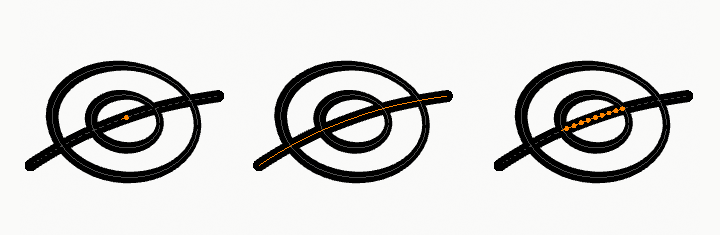
Points, stroke and in between stroke selection sample.
Select All/None/Invert
All these options have the same meaning and behavior as in Object Mode.
Select Random (Selecteer Willekeurig)
Reference (Referentie)
- Mode (Modus):
Edit Mode (Bewerkingsmodus)
- Menu:
Randomly selects unselected points or strokes.
- Ratio (Ratio)
The likelihood of an unselected elements being selected. Note that, this is not the percentage amount of elements that will be selected.
- Random Seed (Willekeurige Zaadwaarde)
Seed used by the pseudo-random number generator.
- Action (Actie)
Selection or deselection of elements.
Select Alternated
Reference (Referentie)
- Mode (Modus):
Edit Mode (Bewerkingsmodus)
- Menu:
Selects alternate points in the selected strokes.
Select More/Less (Selecteer Meer/Minder)
Reference (Referentie)
- Mode (Modus):
Edit Mode (Bewerkingsmodus)
- Menu:
- Shortcut (Sneltoets):
Ctrl-NumpadPlus, Ctrl-NumpadMinus
The purpose of these operators is to reduce or enlarge the current selection within a stroke (i.e. they will never “go outside” of a stroke or “jump” to another stroke in the same object).
- More (Meer)
For each selected point, select all its linked points (i.e. one or two…).
- Less (Minder)
For each selected point, if all points linked to this point are selected, keep this one selected. Otherwise, deselect it.
Hint
When all points of a stroke are selected, nothing will happen (as for Less, all linked points are always selected, and of course, More cannot add any). Conversely, the same goes when no points are selected.
By Stroke Type
Reference (Referentie)
- Mode (Modus):
Edit Mode (Bewerkingsmodus)
- Menu:
Selects curves based on whether they are strokes or fills.
- Type (Type)
- Stroke:
Select all stroke curves (outlines).
- Fill (Vullen):
Select all fill curves (enclosed filled shapes).
- Deselect (Deselecteren)
If enabled, matching curves are deselected instead of selected.
Select Similar (Selecteer Vergelijkbaar)
Reference (Referentie)
- Mode (Modus):
Edit Mode (Bewerkingsmodus)
- Menu:
- Shortcut (Sneltoets):
Shift-G
Select all strokes with similar characteristics.
- Mode (Modus)
The characteristics to compare.
- Layer:
Selects all the points/strokes with a similar layer index.
- Materiaal:
Selects all the points/strokes with a similar material index.
- Vertex Color:
Selects all the points/strokes with a similar vertex color.
- Radius:
Selects all the points/strokes with a similar stroke radius.
- Opacity (Doorzichtigheid):
Selects all the points/strokes with a similar layer opacity
- Threshold (Drempel)
How similar the selection must be.
Select Fill
Reference (Referentie)
- Mode (Modus):
Edit Mode (Bewerkingsmodus)
- Menu:
- Shortcut (Sneltoets):
Ctrl-L
Selects all curves that belong to the same fill region as the active curve.
Grease Pencil fills can be composed of multiple boundary curves. This operator expands the current selection to include all curves that define the same enclosed fill area.
This is useful when editing or transforming an entire filled shape, ensuring that all boundary strokes are selected together.
Select Linked (Selecteer Gekoppeld)
Reference (Referentie)
- Mode (Modus):
Edit Mode (Bewerkingsmodus)
- Menu:
- Shortcut (Sneltoets):
L
Selects the stroke under the cursor along with all connected points belonging to the same stroke.
This is useful for quickly selecting an entire stroke for editing, transforming, moving between layers, or applying material changes.
- Deselect Linked
Removes the linked stroke under the cursor from the selection.
Shortcut: Shift-L
Select First/Last
Reference (Referentie)
- Mode (Modus):
Edit Mode (Bewerkingsmodus)
- Menu:
These operators will toggle the selection of the first or last point(s) of the stroke(s) in the object. This is useful to quickly find the start of a stroke.