Crop Node
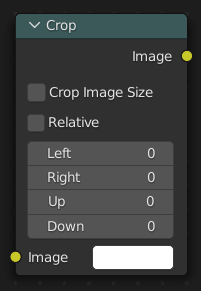
The Crop node crops an input image to a selected region by either making the cropped area transparent or by resizing the input image.
Inputs
- Image
Standard color input. If no image is selected, an image filled with the selected color is used. You can use and crop this image in combination with another background image.
- X
The X position of the lower left corner of the crop region.
- Y
The Y position of the lower left corner of the crop region.
- Width
The width of the crop region.
- Height
The height of the crop region.
- Alpha Crop
Set areas outside the crop region to be transparent instead of changing the dimensions of the image.
When enabled, the output image retains the same resolution as the input image, with pixels outside the crop region replaced by transparency.
When the node is active and Active Node is enabled, the crop region can be adjusted interactively in the backdrop or Image editor.
Outputs
- Image
Standard color output.