Collider
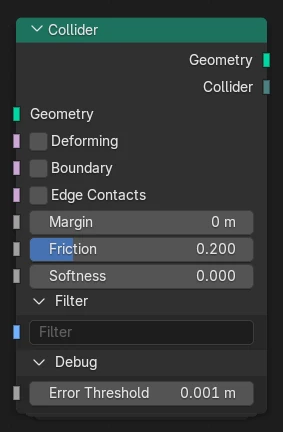
Set up a mesh as an external collider for simulation nodes.
Inputs
- Geometry
The collider geometry.
- Deforming
Should be enabled if the collider geometry is deforming over time. In this case each point of the collider is interpolated individually.
If the geometry is not deforming then this option can be disabled for improved performance. This is also possible when the surface is transformed as an instance without changing local positions.
- Boundary
Changes behavior such that colliding geometry is kept inside the collider instead of outside.
- Edge Contacts
Enable contact detection between simulated geometry and collider mesh edges. This prevents intersection in case of thin geometry and/or colliders with sharp angles.
Without edge contacts edges can pass through faces as long as the end points are outside the collider. On smooth colliders this effect may not be noticeable. In this case edge contacts can be disabled for improved performance.
Warning
Edge contacts are currently only supported for curve geometry (hair simulation).
- Margin
Additional collision offset from the surface to avoid penetration.
- Friction
Coefficient for static and dynamic friction. Small friction coefficients model a slippery material while larger values create sticky behavior.
The exact meaning of the coefficient can be understood as the tangent of the friction angle (wikipedia): When the angle of the contact force to the surface normal is small the contact is in static friction and sticks the surface. Once the contact force exceeds the friction angle it enters dynamic friction and slows down proportional to the tangential velocity.
- Softness
Allow soft collision by correcting positions proportional to penetration depth.
- Filter
Comma-separated list of filter tags this collider should apply to. Only simulated geometries with at least one matching tag will collide with it.
Debug
- Error Threshold
Threshold for computing relative error contribution. The relative error of a contact is 1 or less when the contact penetration is less than this threshold after applying the solver.
Outputs
- Geometry
The input geometry with additional collider information attached.