Transfer Attributes Node
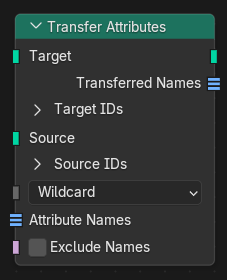
The Transfer Attributes node copies attributes from a source geometry to a target geometry.
Attributes are matched by name and transferred between elements using ID fields. If an element on the target has an ID that matches an element on the source, the corresponding attribute value is copied to the target.
This is useful for transferring a dynamic set of attributes between geometries, especially when the geometries have matching topology, custom element IDs, or attributes with different data types.
The target geometry topology is not changed. Only top-level attributes are transferred; nested instances are ignored.
Inputs
- Target
Geometry to receive the transferred attributes.
- Target Point ID
ID field used to match points on the target geometry.
- Target Edge ID
ID field used to match edges on the target geometry.
- Target Face ID
ID field used to match faces on the target geometry.
- Target Corner ID
ID field used to match face corners on the target geometry.
- Target Curve ID
ID field used to match curves on the target geometry.
- Target Instance ID
ID field used to match instances on the target geometry.
- Source
Geometry to copy attributes from.
- Source Point ID
ID field used to match points on the source geometry.
- Source Edge ID
ID field used to match edges on the source geometry.
- Source Face ID
ID field used to match faces on the source geometry.
- Source Corner ID
ID field used to match face corners on the source geometry.
- Source Curve ID
ID field used to match curves on the source geometry.
- Source Instance ID
ID field used to match instances on the source geometry.
- Pattern Mode
How attribute name patterns are interpreted.
- Exact:
Transfers attributes whose names exactly match the listed names.
- Wildcard:
Transfers attributes whose names match the listed patterns.
Patterns may contain a single wildcard character (
*).
- Attribute Names
List of attribute names or patterns to transfer.
When using Wildcard mode, a single wildcard character (
*) can be used in each pattern.- Exclude Names
Inverts the attribute name list.
When enabled, all attributes except those matching the listed names or patterns are transferred.
Outputs
- Target
Target geometry with the transferred attributes.
- Transferred Names
List of names of attributes that were transferred.
Internal attributes are not included.